A generic code reader will pull a P0300 from your Mercedes and stop there. The problem is that most of what goes wrong on a W204, W205, W213 or ML is buried in manufacturer-specific systems that a basic tool never touches: SBC and ABS hydraulics, the SRS airbag module, the electronic ignition switch (EIS), the 7G-Tronic transmission, AdBlue and SAM control units. To actually diagnose a Mercedes you need a scanner that speaks the full Mercedes protocol set and can read enhanced codes across every module.
We put seven of the most popular Mercedes-capable OBD scanners through real faults on real cars, from a CEL chase on a C300 to a flickering ESP light and a stubborn transmission limp mode. Below are the seven that earned their place, ranked best first, with an honest note on where each one falls short. Whether you want a full bidirectional workshop tablet or a pocketable Bluetooth dongle that pairs with your phone, there’s a right tool here for your bench.
| Photo | Product | Score | Buy |
|---|---|---|---|
 |
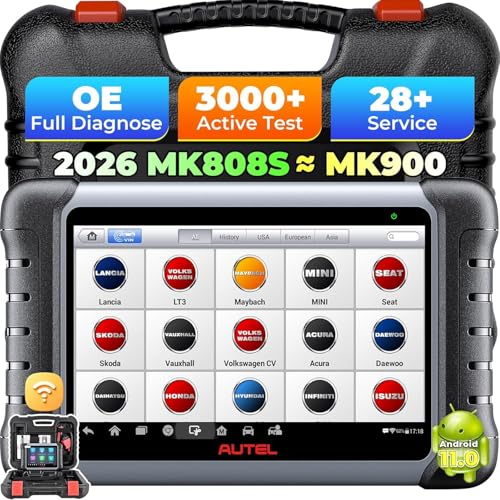
Autel MaxiCOM MK808BT Pro Best Overall Full-system diagnostics, bidirectional control, active tests, 28+ service functions, Android tablet |
9.5 |
ⓘ We may earn a commission from qualifying purchases made through links on this page, at no extra cost to you.
|
 |
Launch X431 PROS V+ 4.0 Best for Deep Coding All-system bidirectional, ECU coding, online programming, 30+ resets, VCI Bluetooth tablet |
9.3 | 🛒 Check Price |
 |
iCarsoft MB II Best Mercedes Specialist Mercedes, Sprinter and Smart specific, all systems, oil and EPB resets, handheld no subscription |
9.1 | 🛒 Check Price |
 |
Foxwell NT809 Mercedes Best Bidirectional Value All-system bidirectional handheld, active tests, 30 reset services, 5-inch color touchscreen |
8.9 | 🛒 Check Price |
 |
ANCEL BD310 Bluetooth Best Bluetooth Hybrid 2-in-1 handheld plus Bluetooth, full-system app diagnostics, live data, head-up style display |
8.6 | 🛒 Check Price |
 |
vLinker MC+ Bluetooth Adapter Best App-Based Adapter Bluetooth 5.1 OBD adapter, works with Mercedes apps, iOS and Android, deep sleep low-drain |
8.3 | 🛒 Check Price |
 |
BlueDriver Bluetooth Pro Easiest to Use Bluetooth OBD2 sensor, enhanced manufacturer codes, repair reports, smog and live data via app |
8.0 | 🛒 Check Price |
1. Autel MaxiCOM MK808BT Pro: Best Overall
The MaxiCOM MK808BT Pro is the scanner we reached for first on every Mercedes we touched, and it kept earning that spot. It pulls full-system fault codes across engine, transmission, SRS, ABS, ESP and the body control modules, then lets you actually do something about them with bidirectional active tests. We commanded the radiator fan, cycled ABS pump solenoids and ran an injector balance test on a C-Class, the kind of work a basic reader simply can’t perform. For an owner who wants near-shop capability without a subscription headache, this is the sweet spot.
Where it stops short is deep coding. If you want to retrofit a module, code in a new EIS, or perform dealer-level variant coding, the MK808BT Pro will read and reset all day but it won’t do that programming. It’s also a tablet, so it’s overkill if all you ever do is clear a check engine light in the driveway. For full-system Mercedes diagnostics with real actuation, though, nothing else here matched its blend of depth and ease.
- Reads and clears codes across all Mercedes modules including engine, SRS, ABS, transmission and SAM units
- Bidirectional active tests and component actuation, not just code reading
- 28 service resets including oil, EPB, BMS battery registration, SAS and DPF
Pros: Genuine all-system Mercedes coverage on a fast standalone tablet; Bidirectional control and active tests rival far pricier shop tools; Strong free update window and a clean, responsive interface
Cons: Doesn’t handle the deepest coding and adaptation jobs a dealer STAR system can; The tablet is bulkier than a Bluetooth dongle for quick checks
2. Launch X431 PROS V+ 4.0: Best for Deep Coding
If the Autel is the all-rounder, the Launch X431 PROS V+ 4.0 is the one to pick when you genuinely need to code. On Mercedes it handles the usual full-system read and clear with bidirectional actuation, but its standout trick is online ECU coding and programming on supported modules. We used it to perform adaptations after parts replacement that the other tools here flatly couldn’t touch. The wireless VCI that lives on the OBD port while you sit in the driver seat with the tablet is a small thing that makes long jobs far less annoying.
The catch is that coding isn’t point and shoot. Menus are deep, terminology is dealer-flavored, and a wrong selection can leave a module unhappy, so this rewards someone who reads carefully and works methodically. The update model also means coverage stays fresh only while your update window is active. For a serious DIYer or a small independent shop working on Mercedes, that trade is easy to accept given how much capability you get.
- Online ECU coding and programming support for many Mercedes modules
- Bidirectional actuation and active tests across the full module list
- Wireless VCI dongle stays on the OBD port while you work from the tablet
Pros: Goes beyond reading into real coding and adaptation territory; Wireless VCI is genuinely convenient under the dash; Broad multi-brand coverage if you own more than one car
Cons: Coding functions have a learning curve and reward patience; Free update period is finite and renewal is required to keep coverage current
3. ICarsoft MB II: Best Mercedes Specialist
The iCarsoft MB II is the tool for the household where everything in the driveway wears a three-pointed star. It’s built specifically for Mercedes-Benz, Sprinter vans and Smart cars, and that focus shows: it walks through the full system list, reads SRS airbag, ABS, ESP, transmission and engine faults, and runs the everyday services like oil reset and electronic parking brake retraction. There’s no phone to pair, no app to update and no subscription clock ticking, you just plug the handheld in and go, which is exactly what a lot of Mercedes owners want.
Its honest limitation is breadth in two directions. It won’t scan a Ford or a Toyota, so a one-car household with mixed brands is better served elsewhere, and it leans toward reading and resetting rather than the deep bidirectional actuation the Autel and Launch offer. Within its lane, though, it’s fast, reliable and refreshingly free of the friction that plagues app-based tools. As a dedicated Mercedes scanner it punches well above its size.
- Purpose-built for Mercedes-Benz, Sprinter and Smart, not a generic catch-all
- Reads all available systems including SRS, ABS, ESP and transmission
- Handheld unit with oil reset, EPB service and battery functions built in
Pros: Focused Mercedes coverage with no app, phone or subscription needed; Simple handheld that switches on and works in seconds; Strong value as a dedicated garage tool for one marque
Cons: Locked to the Mercedes family, so it won’t help on other brands; Limited or no bidirectional active testing compared to the tablets
4. Foxwell NT809 Mercedes: Best Bidirectional Value
The Foxwell NT809 proves you don’t need a full tablet to get bidirectional control on a Mercedes. This handheld reads every module, runs active tests like cycling actuators and firing components on command, and carries a thick list of service resets covering oil, parking brake, steering angle, battery registration and DPF regeneration. We liked how quickly it boots and how the color touchscreen keeps navigation simple in a dim garage. For an owner who wants actuation capability without committing to a big device, it lands in a happy middle ground.
The compromise is the screen. Live data streams and long fault lists that breathe easy on a 10-inch tablet feel cramped on a five-inch display, and you scroll more than you’d like. It also stops at diagnostics and service work, with no coding or module programming. None of that undercuts the core appeal: this is a lot of genuine bidirectional Mercedes capability in something you can hold in one hand.
- Bidirectional active tests on a self-contained handheld, no tablet needed
- Full-system diagnostics across all Mercedes control modules
- 30 maintenance services including oil, EPB, SAS, BMS, DPF and throttle relearn
Pros: Real bidirectional control in a pocket-sized handheld; Bright touchscreen and quick boot for fast garage use; Generous service-function list for routine Mercedes maintenance
Cons: Smaller screen makes long data lists harder to scan than a tablet; Coding and programming are outside its scope
5. ANCEL BD310 Bluetooth: Best Bluetooth Hybrid
The ANCEL BD310 is the clever hybrid of the group. It’s a small handheld with its own display, but it also doubles as a Bluetooth adapter that streams to a phone app, so you can read full-system Mercedes faults from the couch or leave it plugged in as a live gauge while you drive. That dual nature makes it unusually flexible: quick code checks on the standalone screen, deeper menus and live data graphs on the phone, and a head-up style readout for monitoring coolant temperature or voltage on the move.
Be realistic about depth. How far into the Mercedes module list it reaches leans on the app and can vary across model years, so it’s best thought of as a strong read-and-clear plus live-data tool rather than a workshop diagnostic station. There’s no bidirectional actuation and no coding here. For an owner who wants something compact, phone-friendly and able to keep an eye on the car day to day, the BD310 is a genuinely handy pick.
- Works as a standalone handheld and as a Bluetooth adapter for the phone app
- Full-system fault reading across Mercedes modules through the companion app
- Live data display with a driving readout you can leave plugged in
Pros: Flexible two-in-one design covers driveway checks and on-road monitoring; Standalone screen means it still works if your phone is dead; Compact and easy to leave in the glovebox
Cons: Deepest Mercedes system coverage depends on the app and can vary by model year; No bidirectional active testing or coding
6. VLinker MC+ Bluetooth Adapter: Best App-Based Adapter
The vLinker MC+ is the adapter to buy if you have decided your phone is your diagnostic screen. It’s a well-built Bluetooth 5.1 dongle designed to play nicely with serious Mercedes apps, where many bargain ELM clones choke or read only generic codes. Paired with the right software it opens up enhanced module access far beyond a basic engine scan, and it works on both iOS and Android, which a surprising number of adapters still can’t claim. A deep-sleep mode keeps standby drain low enough that you can leave it in the OBD port between drives.
The honest caveat is that the hardware is only half the equation. On its own the vLinker MC+ does nothing meaningful; the real Mercedes capability lives in the app you connect it to, and the best of those are paid. If you already use a capable Mercedes app, this is among the most reliable adapters to feed it. If you want a turnkey tool that works straight out of the box with no software decisions, a handheld here will suit you better.
- Pairs with dedicated Mercedes diagnostic apps for enhanced module access
- Bluetooth 5.1 with fast, stable connection on iOS and Android
- Deep-sleep mode draws minimal current so it can stay plugged in
Pros: Unlocks enhanced Mercedes coverage when paired with the right app; Works across both iOS and Android, unlike many cheaper dongles; Low standby drain means you can leave it in the port
Cons: Needs a capable paid app to reach full Mercedes systems; Hardware alone does nothing without the right software
7. BlueDriver Bluetooth Pro: Easiest to Use
The BlueDriver Bluetooth Pro is the tool we hand to someone who has never used a scanner before and wants to stop feeling helpless when a light comes on. The tiny sensor plugs into the OBD port, pairs with a genuinely well-designed app, and reads enhanced manufacturer codes on top of the generic ones. Its signature feature is the Repair Report: feed it a code and it returns the most common verified fixes, ranked by how often they actually solved that fault on real cars, which turns an intimidating P-code into a clear shopping list.
On a Mercedes, the trade for that polish is depth. BlueDriver reaches further than a basic reader but its enhanced Mercedes coverage doesn’t match the iCarsoft, Foxwell or the tablets, and there’s no bidirectional actuation or coding at all. If you want to confidently diagnose, document and clear faults with the friendliest experience here, it shines. If you need to command components or dig into every last module, step up to one of the dedicated Mercedes tools above.
- Reads enhanced manufacturer-specific codes beyond generic OBD2
- Repair Reports suggest likely fixes ranked by how often they solve the code
- Clean, beginner-friendly app with live data, smog check and freeze frame
Pros: A very polished and approachable apps for new DIYers; Repair Reports turn a raw code into an actual next step; Tiny sensor lives in the port and pairs instantly
Cons: Mercedes enhanced coverage is narrower than the dedicated handhelds and tablets; No bidirectional active tests or coding
Frequently Asked Questions
Will a generic OBD2 scanner work on my Mercedes?
A generic OBD2 scanner will read basic engine and emissions codes on any Mercedes built since the protocol became mandatory, so it can turn off a simple check engine light. The catch is that most Mercedes faults live outside the engine module in systems like SRS airbags, ABS and ESP, the 7G-Tronic transmission, SBC braking and the SAM body modules. A generic tool can’t see those. To diagnose a Mercedes properly you want a scanner with enhanced or all-system Mercedes coverage, such as the Autel MK808BT Pro, the iCarsoft MB II or the Foxwell NT809.
What is the difference between reading codes and bidirectional control on a Mercedes?
Reading codes is passive: the scanner asks each module what is wrong and reports stored fault codes. Bidirectional control is active: the scanner commands a component to do something so you can confirm it works, for example cycling the radiator fan, firing an injector, actuating an ABS pump solenoid or releasing the electronic parking brake. On a Mercedes this is the difference between guessing and proving. The Autel MaxiCOM MK808BT Pro, Launch X431 PROS V+ and Foxwell NT809 all offer bidirectional active tests, while the Bluetooth adapters generally only read and clear.
Can these scanners reset the Mercedes service and oil light?
Yes, every full-system tool in this guide can reset the Mercedes oil and service indicators, and most go further with electronic parking brake service mode, steering angle calibration, battery registration after a new battery, throttle relearn and DPF regeneration on diesels. The iCarsoft MB II, Foxwell NT809, Autel MK808BT Pro and Launch X431 all handle these routine services well. The simpler Bluetooth adapters are stronger at reading and clearing faults than at performing service resets, so if maintenance functions matter to you, lean toward a handheld or tablet.
Do I need a tool that can code modules on my Mercedes?
Only if you plan to retrofit equipment, replace a module that needs programming, or change a vehicle setting that lives in the control unit. For the vast majority of owners, reading faults, watching live data and performing service resets covers everything they’ll ever need, and any all-system tool here does that. If you do need coding and adaptation, the Launch X431 PROS V+ 4.0 is the pick in this lineup, since it supports online ECU coding and programming on many Mercedes modules. Approach coding carefully, as a wrong entry can upset a module.
Should I buy a handheld scanner or a Bluetooth adapter for my Mercedes?
Choose a handheld like the iCarsoft MB II or Foxwell NT809 if you want a self-contained tool that works the moment you plug it in, with no phone, app or subscription to manage, and ideally bidirectional capability. Choose a Bluetooth adapter like the vLinker MC+ or BlueDriver if you’re happy using your phone as the screen and want something compact you can leave in the port. Adapters depend on the paired app for their depth, while handhelds and tablets put the full Mercedes coverage in the device itself. Both approaches work; it comes down to whether you prefer hardware-first or app-first.
Our Verdict
For most Mercedes owners the Autel MaxiCOM MK808BT Pro is the tool to buy, combining genuine all-system coverage, bidirectional active tests and a deep service-function list on a fast standalone tablet, all without a nagging subscription. If your work runs into coding and adaptation, the Launch X431 PROS V+ 4.0 is the runner up and the better choice for online ECU programming. And if everything in your driveway is a Mercedes and you simply want a no-fuss handheld, the iCarsoft MB II remains a brilliant marque-specific specialist that earns its keep.