A basic code reader tells you a check engine light is on. A professional automotive diagnostic scanner tells you why, lets you command components to test them, resets service intervals, bleeds ABS modules, and reads every controller in the vehicle, not just the engine. If you turn wrenches for a living or you’re a serious DIY owner who refuses to guess, that difference is the whole job.
We put the leading professional scanners through real-world work on domestic, Asian, and European vehicles, paying attention to bidirectional control, special functions, OE-level coverage, and how the software actually behaves in a busy bay. Below are the seven that earned a place in our kit, ranked best first, with honest notes on where each one falls short.
| Photo | Product | Score | Buy |
|---|---|---|---|
 |
Autel MaxiSys Ultra Best Overall 12.9-inch tablet, topology mapping, built-in 5-in-1 VCMI oscilloscope and multimeter |
9.5 |
ⓘ We may earn a commission from qualifying purchases made through links on this page, at no extra cost to you.
|
 |
Launch X431 PRO5 Best Coverage Value Dual-mode connection, 40-plus reset services, broad domestic, Asian, and European coverage |
9.3 | 🛒 Check Price |
 |
Snap-on Zeus Best OE-Level Data Intelligent Diagnostics, guided component tests, wireless scope-ready platform |
9.1 | 🛒 Check Price |
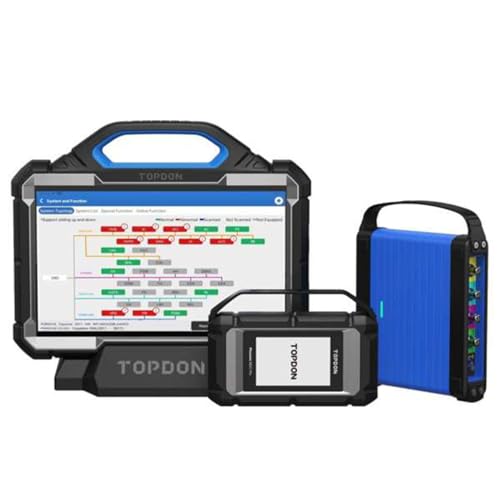 |
Topdon Phoenix Max Best Built-In Scope 13.3-inch display, 4-channel oscilloscope, ADAS calibration support, topology mapping |
8.9 | 🛒 Check Price |
 |
Thinkcar Thinktool Pro Best Modular System Full-system diagnostics, 28-plus reset functions, add-on module expansion |
8.6 | 🛒 Check Price |
 |
Foxwell GT60 Plus Best for Independent Shops Full-system bidirectional, 30-plus service functions, lifetime free updates on supported lines |
8.4 | 🛒 Check Price |
 |
Ancel X7 Best Entry Pro Tablet Full-system diagnostics, bidirectional control, wireless VCI, common reset services |
8.0 | 🛒 Check Price |
1. Autel MaxiSys Ultra: Best Overall
The MaxiSys Ultra is the tool we reached for first on every hard job. The standout is the intelligent topology map, which draws every control module on the vehicle network and colors the failed ones, so chasing a communication fault stops being guesswork. Bidirectional control is comprehensive, the special functions list is enormous, and OE-level access on the makes we researched matched what dealer tools deliver. The integrated VCMI adds a four-channel oscilloscope and multimeter right inside the tablet, which is genuinely useful when you need to verify a sensor signal instead of trusting a code.
The honest weakness is the learning curve. There’s so much capability here that a tech new to Autel will spend real time finding where functions live, and the menu depth can feel overwhelming on a quick job. It also leans on its annual subscription to stay current, and letting that lapse slowly erodes the value of an otherwise outstanding machine. For a working shop that wants one tool to do almost everything, though, nothing else in our group covered as much ground.
- Intelligent topology module map that flags faulty controllers in color
- Full bidirectional control and OE-level coverage across most makes
- Integrated VCMI scope, multimeter, signal generator, and CAN bus tester
Pros: Deepest coverage and special functions of anything we researched; Topology mapping saves real diagnostic time on network faults; Built-in scope removes the need for a separate bench tool
Cons: Steep learning curve for new technicians; Annual software renewal is required to keep coverage current
2. Launch X431 PRO5: Best Coverage Value
The X431 PRO5 is the unit we recommend most often to shops that want near-flagship capability without buying the absolute top tier. Coverage is wide across domestic, Asian, and European platforms, the special function count clears forty, and full-system bidirectional control let’s actuate injectors, command radiator fans, and run ABS bleeds without fuss. The Smartlink connector is the clever part, because it supports remote diagnostics, so a senior tech can dial into a stubborn vehicle from another location. That feature alone earns it a place in multi-bay operations.
Where it slips is deep European work. On a few German models we hit functions that the Autel handled cleanly and the Launch either lacked or buried. Some menu text also reads like a rough translation, which is harmless but occasionally makes you second-guess a selection. None of that undercuts the core point: this is a tremendous amount of professional capability in one fast, well-built tablet.
- Smartlink connector supports remote and wired diagnostics
- More than 40 special reset and service functions out of the box
- Full-system bidirectional actuation and active tests
Pros: Excellent coverage breadth relative to its tier; Smartlink remote diagnostics is a real differentiator; Fast boot and responsive Android interface
Cons: European coverage trails the top Autel units on some models; Menu translations can read awkwardly in places
3. Snap-on Zeus: Best OE-Level Data
The Zeus is the technician’s technician tool. Its Intelligent Diagnostics feature takes a raw code and surfaces the most relevant tests, top reported fixes, and real fixture-style data so you stop reading manuals and start testing. Guided component tests pair live readings with known-good reference waveforms, which shortens the gap between symptom and confirmed cause more than any other workflow in this roundup. The hardware is built like shop equipment should be, and the interface stays smooth even when you’re deep in bidirectional actuations.
The catch is the ecosystem. Snap-on coverage and updates run through a dealer-driven sales and software program rather than a simple online renewal, so keeping the tool current is less of a self-serve experience than the Android tablets here. It’s also overkill for a casual owner. For a full-time diagnostic tech who lives in guided testing, however, the Zeus is hard to beat on day-to-day workflow.
- Intelligent Diagnostics filters codes to the most likely fix
- Guided component tests with known-good waveform references
- Fast, fluid touchscreen built for heavy daily bay use
Pros: Best guided-diagnostic workflow we researched; Rugged hardware made for full-time professional use; Strong dealer-style coverage and data presentation
Cons: Software updates depend on a dealer-driven program; Less DIY-friendly than tablet-style Android units
4. Topdon Phoenix Max: Best Built-In Scope
The Phoenix Max punches well above expectations for an independent shop tool. The 13.3-inch display is the largest in our group and makes reading multi-PID live data and scope waveforms genuinely comfortable. The integrated four-channel oscilloscope means most circuit-level testing happens on the same device, topology mapping helps with network faults, and bidirectional control plus active tests covered everything we threw at it across mainstream makes. For a shop building out modern capability in one purchase, the feature set is impressive.
The reservation is maturity. Topdon is a credible brand, but its support network and software ecosystem are younger than the long-established players here, and that can matter when you hit an edge-case vehicle and need fast help. ADAS calibration is supported in software but requires the separate calibration frame and targets, so budget for that if it’s part of your plan. Treat those as known trade-offs and the Phoenix Max is a lot of capable hardware.
- Large 13.3-inch screen with integrated four-channel scope
- ADAS calibration support when paired with the calibration frame
- Topology view plus full bidirectional control and active tests
Pros: Huge display makes live data and waveforms easy to read; Strong feature-to-value ratio for a busy independent shop; Built-in scope handles most circuit testing on its own
Cons: Ecosystem and support network are younger than Autel or Snap-on; ADAS work needs additional hardware sold separately
5. Thinkcar Thinktool Pro: Best Modular System
The Thinktool Pro takes a modular approach that suits a shop growing into deeper diagnostics. The base tablet handles full-system scanning, over twenty-eight reset and service functions, and bidirectional control on supported vehicles, then you bolt on modules like a scope box, video borescope, or printer as your work demands them. That staged path keeps the entry point reasonable while leaving room to grow, and the interface is friendly enough that newer techs were productive on it quickly during testing.
The honest limitation is that the base unit shows its tier on the toughest jobs. Coverage depth and special functions don’t reach the flagship Autel or Snap-on level, and to get near their capability you end up buying the expansion modules, which adds up. As a flexible everyday workhorse that you can grow over time, though, it fills a real gap between hobby readers and top-end pro stations.
- Add-on modules for scope, video scope, and printer expansion
- More than 28 reset and maintenance service functions
- Full-system scan with bidirectional control on supported makes
Pros: Modular design lets you add capability over time; Solid full-system coverage for everyday repair work; Comfortable interface that techs pick up quickly
Cons: Add-on modules are needed to unlock its full potential; Coverage depth trails the flagship units on complex jobs
6. Foxwell GT60 Plus: Best for Independent Shops
The GT60 Plus is the practical pick for an independent shop that needs real bidirectional capability without a flagship commitment. It reads all systems, performs active component tests, and carries more than thirty service functions including DPF regeneration, steering angle reset, and oil service resets, which covers the bread-and-butter work most general repair bays see every day. Foxwell also leans on free update support for supported lines, which lowers the long-term cost of keeping it useful and removes a common subscription headache.
The hardware is where the tier shows. The tablet feels less premium in hand than the top units, and while European coverage is respectable it doesn’t reach the dealer-deep level the Autel and Snap-on tools hit on complex German vehicles. For domestic and Asian work and for the majority of daily repairs, though, it delivers dependable professional function and earns its keep.
- Full-system access with active tests and component actuation
- More than 30 maintenance service resets including DPF and SAS
- Free update support on supported vehicle lines
Pros: Genuinely useful bidirectional control at its tier; Free updates reduce long-term ownership friction; Reliable performance on mainstream domestic and Asian makes
Cons: Build feels less premium than the flagship tablets; European coverage is good but not dealer-deep
7. Ancel X7: Best Entry Pro Tablet
The Ancel X7 is the friendliest way into true professional-style diagnostics for a serious DIY owner or a small startup shop. It performs full-system scanning, offers bidirectional active tests on supported vehicles, and handles the common service resets, oil life, electronic parking brake, steering angle, and battery registration, that account for most routine maintenance. The wireless VCI lets you move around the vehicle without dragging a cable, which is a small thing that makes real-world use noticeably easier.
Its ceiling is clear and worth respecting. Coverage breadth, special-function depth, and update cadence all sit below the flagship tablets, so on an unusual or very new vehicle you may hit the edge of what it can do. Within its lane, which is mainstream cars and everyday maintenance, it delivers a lot of legitimate capability and is the easiest tool here to learn from a standing start.
- Wireless VCI connection for working around the vehicle untethered
- Full-system scan with bidirectional active tests on supported makes
- Common service resets like oil, EPB, SAS, and BMS
Pros: Approachable on-ramp to professional-grade diagnostics; Wireless VCI makes shop use convenient; Covers the core resets most owners and small shops need
Cons: Coverage and special functions are narrower than higher tiers; Update cadence is slower than the flagship brands
Frequently Asked Questions
What is the difference between a professional diagnostic scanner and a basic code reader?
A basic code reader pulls and clears generic engine trouble codes and little else. A professional automotive diagnostic scanner reads every control module in the vehicle, including ABS, airbag, transmission, body, and infotainment, and adds bidirectional control so you can command components to test them directly. Professional tools also perform special functions like ABS bleeds, throttle relearns, service resets, and module coding, and they show live data from many sensors at once. If you only want to know why a check engine light is on, a reader will do. If you need to diagnose and repair across the whole vehicle, you need a pro scanner.
Do I really need bidirectional control?
For professional repair work, yes. Bidirectional control lets the scanner send commands to the vehicle rather than only reading from it, so you can cycle a radiator fan, fire an injector, actuate an ABS pump during a brake bleed, or command the EVAP system closed to find a leak. That turns diagnosis from guessing which part failed into proving it on the spot. Every scanner in this roundup offers bidirectional control to some degree, and it’s the single feature that most separates a true professional tool from a glorified code reader.
Will one scanner cover every make and model?
No single tool gives perfect dealer-level access on every brand, and any company that claims otherwise is overselling. The flagship units like the Autel MaxiSys Ultra and Snap-on Zeus come closest to broad OE-level coverage, while value-focused tools tend to be strongest on domestic and Asian makes and slightly thinner on deep European functions. Before buying, confirm the tool covers the specific vehicles you work on most, and check whether the makes you care about need any add-on software or adapters.
Do professional scanners need a paid subscription?
Most do, in some form. The high-end tools usually include a first year of updates and then charge an annual renewal to keep coverage and special functions current as new vehicles arrive. A few brands, such as Foxwell on supported lines, offer free updates that lower long-term ownership friction. A scanner still works without renewing, but its coverage gradually falls behind newer model years, so factor ongoing update costs into your decision rather than just the tool itself.
Can a professional scanner handle ADAS calibration and module coding?
The higher-tier tools can, but usually with conditions. ADAS calibration on tools like the Topdon Phoenix Max and Autel platforms is supported in software, yet it requires the physical calibration frame, targets, and proper alignment to actually perform the job, and that hardware is bought separately. Module coding and programming support varies by brand and vehicle and sometimes needs a stable internet connection and additional licensing. If ADAS or coding is central to your business, verify both the software support and the required hardware before you commit.
Our Verdict
For a working shop that wants one tool to handle almost everything, the Autel MaxiSys Ultra is our top pick, thanks to its topology mapping, deep coverage, and built-in oscilloscope that together shorten real diagnostic time. Our runner up is the Launch X431 PRO5, which delivers near-flagship coverage, more than forty service functions, and clever Smartlink remote diagnostics in a faster, more approachable package. Choose the Ultra if you want maximum capability and the PRO5 if you want the strongest balance of breadth and everyday usability.
