Driving for Uber or Lyft means strangers are in your car all day and night, and a good dash cam is the cheapest insurance against a disputed fare, a false complaint, or a fender bender that wasn’t your fault. Unlike a normal road cam, a rideshare cam needs a second lens pointed at the cabin, plus solid infrared night vision so faces are clear after dark when most of the messy rides happen.
We focused on dual and triple channel cams that record the road and the interior at the same time, with good low light performance, simple loop recording, and parking protection for when your car sits between shifts. Every pick below is a real model you can find on Amazon right now, ranked best first for the specific job of protecting a rideshare driver.
| Photo | Product | Score | Buy |
|---|---|---|---|
 |
Vantrue N4 Pro 3 Channel Dash Cam Best Overall for Rideshare Three channel front 4K + cabin 1080P + rear 1080P, dual Sony STARVIS 2, four infrared LEDs |
9.5 |
ⓘ We may earn a commission from qualifying purchases made through links on this page, at no extra cost to you.
|
 |
Vantrue N2 Pro Dual Dash Cam Best Value for Uber Drivers Dual channel 1080P front + 1080P cabin, infrared night vision, 24 hour parking mode |
9.3 | 🛒 Check Price |
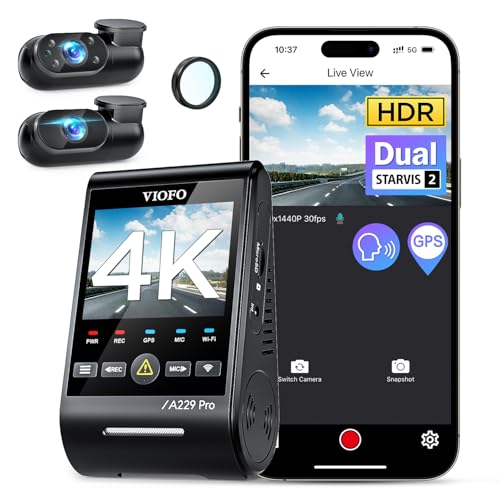 |
VIOFO A139 Pro 3CH Dash Cam Best Front 4K Image Quality Three channel 4K front + 1080P interior + 1080P rear, STARVIS 2 front sensor, 5GHz WiFi |
9.2 | 🛒 Check Price |
 |
Vantrue N4 Dual Plus Dash Cam Best All Around Triple Channel Three channel 1440P front + 1080P cabin + 1080P rear, infrared cabin LEDs, capacitor build |
9.0 | 🛒 Check Price |
 |
Nextbase 622GW Dash Cam Best Stabilization and Smart Features Front 4K with image stabilization, GPS, Emergency SOS, optional Rear View Cabin module |
8.7 | 🛒 Check Price |
 |
REDTIGER F7N 4K Dual Dash Cam Best Easy Install Dual Channel Dual channel 4K front + 1080P rear, GPS, WiFi, free hardwire kit included |
8.4 | 🛒 Check Price |
 |
WOLFBOX i07 4K Mirror Dash Cam Best Mirror Style Setup Mirror dash cam with 4K front, 1080P interior cabin lens, large touchscreen, voice control |
8.0 | 🛒 Check Price |
1. Vantrue N4 Pro 3 Channel Dash Cam: Best Overall for Rideshare
The Vantrue N4 Pro is the cam we would hand to a friend starting on Uber tomorrow. It’s the rare unit that records the road in 4K while still keeping a dedicated cabin lens and a rear lens running, so a single device covers every angle a rideshare driver actually argues about. The dual Sony STARVIS 2 sensors and four infrared LEDs are the real story here. In a dark parking lot the cabin view still shows clear faces and movement, which is exactly when you want proof of who said and did what.
The honest weakness is size and heat. This is a chunky three lens unit, and on a hot day parked in the sun the N4 Pro runs warm, which is true of most cams that push this much data. You’ll also want a high endurance card rated for continuous writing, because 4K front footage plus two more channels eats storage quickly. Plan for a 256GB card and a proper hardwire kit, and in return you get the most complete coverage on this list.
- True three channel recording captures road ahead, the cabin, and the rear at the same time
- Sony STARVIS 2 sensors plus four infrared LEDs keep passenger faces clear in full darkness
- 24 hour parking mode with buffered motion and impact detection when wired to constant power
Pros: Cabin footage stays sharp at night without any visible light bothering passengers; One unit handles all three angles so wiring is simpler than running separate cameras; Reliable loop recording and time lapse parking mode that doesn’t drain the battery quickly
Cons: The three lens body is bulky and takes up noticeable windshield space; Full 4K plus dual channels fills cards fast so a high endurance 256GB card is a must
2. Vantrue N2 Pro Dual Dash Cam: Best Value for Uber Drivers
The N2 Pro is the cam that made Vantrue a default name among Uber and Lyft drivers, and it still earns the value crown. It was purpose built for cabin recording, with an infrared front facing interior lens that lights faces in the dark without any visible glow that would annoy a passenger. Both channels record at 1080P, which is plenty to read a license plate ahead and to clearly capture who is sitting where on a night run.
What you give up compared to the N4 Pro is resolution and a rear view. The front is 1080P rather than 4K, so a plate two cars ahead at speed can be soft, and there’s no third lens watching behind you. For most rideshare disputes that involve the cabin and the car directly in front, none of that matters, which is why this remains the cam we recommend to drivers who want proven protection without the bulk of a triple channel rig.
- Dedicated infrared cabin lens designed for taxi and rideshare interior recording
- Front and inside record together at 1080P each with clear plate readable footage
- Discreet compact body that mounts low and doesn’t block the driver view
Pros: Infrared cabin view is genuinely usable at night with passengers in the back; Proven, widely owned model with a long track record among rideshare drivers; Simple menu and reliable loop recording that just works day after day
Cons: Only 1080P front, so distant plates are less sharp than a 4K cam; No built in rear channel without buying a separate setup
3. VIOFO A139 Pro 3CH Dash Cam: Best Front 4K Image Quality
If you want the sharpest possible view of the road and plates, the VIOFO A139 Pro 3CH is hard to beat. Its front STARVIS 2 sensor shooting in 4K resolves detail that 1080P cams simply miss, so when a car cuts you off and you need the plate, this is the footage you want. It still carries a full interior lens and a rear lens, so the rideshare essentials are covered while you also get standout forward image quality.
The trade off shows up inside the cabin at night. The interior channel is solid, but its infrared performance is a step behind the dedicated cabin lenses on the Vantrue models, so very dark back seat footage is slightly grainier. The other reality is install: to get parking protection you need to hardwire it, which is more involved than a plug and play setup. For a driver who prioritizes forward evidence, those are easy compromises.
- Front 4K with STARVIS 2 sensor delivers crisp daytime plate detail at speed
- Interior and rear channels round out full coverage for the whole vehicle
- Fast 5GHz WiFi and a clean app make pulling clips off the cam quick
Pros: Excellent front video clarity that holds up when zooming into footage; Low profile interior camera that mounts discreetly near the mirror; Strong app experience for reviewing and saving clips on the spot
Cons: Interior infrared night vision is good but not as strong as Vantrue cabin lenses; Requires hardwiring for parking mode which adds install effort
4. Vantrue N4 Dual Plus Dash Cam: Best All Around Triple Channel
The standard N4 sits one rung below the N4 Pro and is the sweet spot for drivers who want all three angles without the very top resolution. You still get the road, the cabin, and the rear from a single unit, and the cabin lens carries the same infrared night vision that makes Vantrue a rideshare favorite. The capacitor based build is a quiet but important detail, since it shrugs off the heat of a car baking in a summer lot far better than a battery would.
The compromise is straightforward: the front records at 1440P instead of 4K, so it’s a notch behind the sharpest cams when you zoom into a distant plate. It’s still very clear for everyday evidence, and most drivers will never feel the difference. As with any triple channel cam, three streams at once chew through storage, so budget for a large high endurance card and you have a dependable all rounder.
- Three lenses in one body covering road, cabin, and rear without extra cameras
- Capacitor based design tolerates heat better than a battery for parked cars
- Infrared cabin recording keeps interior footage clear after dark
Pros: Complete coverage at a friendlier footprint than the N4 Pro; Capacitor handles hot parked interiors more reliably over the long haul; Straightforward setup with the same trusted Vantrue cabin night vision
Cons: Front tops out at 1440P, below the 4K of the Pro and VIOFO; Three channels recording at once still demands a large high endurance card
5. Nextbase 622GW Dash Cam: Best Stabilization and Smart Features
The Nextbase 622GW is the premium feeling option, with a polished touchscreen, sharp 4K front video, and genuinely useful smart features. Image stabilization smooths out the jitter from rough city streets, GPS stamps your speed and location, and Emergency SOS can notify services with your position if you’re knocked out in a crash. Those safety extras matter for a driver who spends long hours alone behind the wheel.
For rideshare use the catch is the cabin. The 622GW doesn’t include an interior lens in the box, so you have to add a Nextbase Rear View module to watch the back seat, which adds to the install and the footprint. The interface is feature rich but can feel a touch slow at times. If you value smart safety tools and forward image quality, and don’t mind adding a module, it’s a strong choice.
- 4K front recording with built in stabilization for smoother footage on rough roads
- Emergency SOS can alert services with your location after a serious crash
- Adds an interior cabin view through Nextbase Rear View modular cameras
Pros: Excellent build quality and a bright responsive touchscreen; Smart safety features like Emergency SOS and what3words location; Image stabilization keeps video steady on potholed city streets
Cons: Cabin coverage needs a separately purchased Rear View module; Larger unit and software that can occasionally feel sluggish
6. REDTIGER F7N 4K Dual Dash Cam: Best Easy Install Dual Channel
The REDTIGER F7N is the easiest on ramp for a new rideshare driver who wants quality video without a complicated install. It records 4K up front and 1080P out the back, includes the hardwire kit in the box so parking mode doesn’t cost extra, and adds GPS and WiFi for route logging and quick clip transfers. For drivers who mostly worry about road incidents and want a tidy two camera setup, it covers a lot of ground.
The thing to understand is that the rear camera points out the back window, not into the cabin, so this isn’t a true interior monitoring rig in the way the Vantrue cabin cams are. You can angle it at the back seat in some installs, but it isn’t purpose built for that. Night footage is perfectly usable but doesn’t match the STARVIS 2 sensors higher on this list. As an affordable, friendly dual cam, it delivers real value.
- 4K front and 1080P rear with a hardwire kit included for parking mode
- Built in GPS and WiFi for easy clip transfer and speed and route data
- Simple plug and play install that beginners can finish quickly
Pros: Hardwire kit in the box makes parking mode setup cheaper and easier; Sharp 4K front footage and easy app based clip review; Beginner friendly setup with a clear menu
Cons: Rear lens faces out the back, not a dedicated cabin interior view; Night performance is fine but trails the STARVIS 2 cams
7. WOLFBOX i07 4K Mirror Dash Cam: Best Mirror Style Setup
The WOLFBOX i07 takes a different approach by replacing your rear view mirror entirely, which keeps the windshield clean and makes the whole setup almost invisible to passengers. It shoots 4K out front and includes a detachable interior lens you can aim at the cabin, so rideshare drivers get both road and inside coverage in one mirror sized package. The large touchscreen and voice control make it pleasant to live with day to day.
Mirror cams come with known quirks, and the i07 is no exception. In bright direct sunlight the screen can glare and footage can wash out at the edges, and dialing in the interior lens angle so it actually frames the back seat takes some fiddling on install. If you want a low profile setup that doesn’t announce itself on the windshield and you’re willing to spend time aligning it, the i07 is a clean looking option that rounds out our list.
- Replaces your rear view mirror to keep the windshield uncluttered
- Detachable interior lens can point at the cabin for rideshare recording
- Large touchscreen with voice control and GPS for hands free use
Pros: Discreet mirror form factor that passengers barely notice; Big bright screen makes reviewing footage and parking easy; Flexible interior lens placement for cabin coverage
Cons: Mirror cams can glare or wash out in strong daylight; Setup and lens alignment take patience to get right
Frequently Asked Questions
Do Uber and Lyft allow dash cams in the car?
Yes, both Uber and Lyft permit dash cams as long as you follow local laws and any city or state rules about recording. The key requirement in most places is disclosure: many regions expect you to inform passengers that audio and video are being recorded, often with a small visible sticker or sign in the car. Recording laws vary by state, especially around audio consent, so check your local rules. A sticker noting that the ride is recorded for safety also tends to keep passengers on better behavior.
Why do rideshare drivers need a cabin facing camera and not just a road cam?
Most disputes a rideshare driver faces happen inside the car, not on the road. False complaints, claims of unsafe driving, damage to the vehicle, and disagreements over what was said all play out in the cabin. A road only cam can’t prove any of that. A dual or triple channel cam with a dedicated interior lens captures who was in the car, what they did, and how the ride actually went, which is the evidence that protects your account and your earnings when a passenger files a baseless report.
How important is night vision for a rideshare dash cam?
It’s among the most important features. A large share of rideshare trips happen after dark, and those late night rides are often when problems occur. A cabin lens with infrared LEDs and a quality sensor like Sony STARVIS 2 keeps faces and movement clear in a pitch black back seat without shining any visible light that would bother a passenger. Cheaper cabin cams produce grainy, useless footage at night, so prioritizing infrared night vision is essential for a driver working evening and overnight shifts.
What size memory card do I need for a dual or triple channel dash cam?
For a dual channel cam, a 128GB high endurance card is a sensible floor, and for a triple channel or 4K setup you should plan on 256GB. Just as important as size is the type of card. Always use a high endurance microSD card designed for continuous recording, not a standard photo card, because dash cams write constantly and ordinary cards wear out and fail quickly. A worn card that stops recording silently is the most common reason a driver finds they have no footage when they need it.
Does a dash cam with parking mode drain my car battery?
A properly installed parking mode draws very little power and most quality cams include voltage cutoff protection that shuts the camera off before your battery gets too low to start the car. Parking mode requires hardwiring the cam to constant power, usually through a hardwire kit connected to your fuse box, rather than the cigarette lighter that only powers on with the engine. If you drive frequently and your battery is healthy, parking mode is safe to leave on and gives you protection while the car sits between shifts.
Our Verdict
For rideshare drivers the Vantrue N4 Pro is our top pick, since its three channel coverage and excellent infrared cabin night vision give you proof of the road, the back seat, and the rear in a single unit, which is exactly what protects your account against false complaints. If you want the same trusted cabin recording without the bulk or the bigger spend, the Vantrue N2 Pro is our runner up and remains the easy value choice that thousands of Uber and Lyft drivers already rely on.
