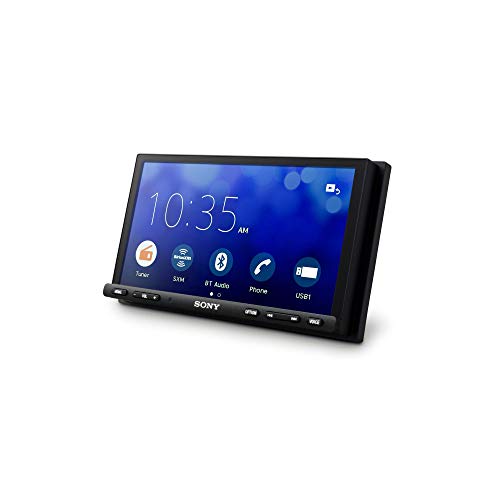
An older car can still feel fresh and connected without a brand new dashboard or an expensive trip to the dealer. A handful of smart upgrades can bring features like smartphone mirroring, hands free calling, and a rear view camera to a vehicle that left the factory years ago. The best part is that many of these additions are plug in friendly, which means you can do a lot of the work yourself in an afternoon.
This guide walks through the most useful and affordable ways to modernize an aging vehicle, where to begin, and which mistakes to avoid. If your factory screen already supports wired smartphone mirroring, one of the easiest wins is going wireless with one of the best wireless CarPlay adapters, so you can leave the cable in the glovebox for good.
Affordable tech upgrades for an older car
You don’t need to replace the whole infotainment system to enjoy modern conveniences. A few targeted gadgets cover most of what drivers miss in an older vehicle.
A wireless CarPlay or Android Auto adapter is a very popular starting points. If your car already has wired smartphone mirroring, the adapter plugs into the existing port and turns it wireless, so the connection happens automatically as you get in. For cars without any mirroring at all, a Bluetooth adapter that feeds into an aux input or an empty cassette slot can add hands free calling and music streaming.
A backup camera is a strong safety addition for vehicles that never had one. Many kits mount near the license plate and display the feed on a small screen or an aftermarket head unit. A dash cam adds confidence for everyday driving and parking, and a simple USB charging upgrade keeps phones and devices topped up. For longer trips, smart tire monitors can warn you about pressure changes before they become a problem.
Step by step: where to start
Modernizing your car is easier when you tackle it in a sensible order rather than buying everything at once.
- Prioritize by what bugs you most. If you constantly fumble with a charging cable, start there. If reversing into tight spots stresses you out, a backup camera should come first.
- Check compatibility before you buy. Confirm whether your car already supports wired smartphone mirroring, what kind of audio inputs it has, and whether there’s a clean place to mount a camera or screen.
- Install the easy plug in upgrades first. Adapters, USB chargers, and Bluetooth receivers usually require little more than connecting to an existing port, which builds confidence before you take on anything involving wiring.
Gadgets and products to consider
Once you know your priorities, you can match products to your needs. For smartphone mirroring without a cable, look at the best wireless CarPlay adapters that suit your current head unit and phone.
For sound and calls, a quality Bluetooth receiver is a low effort upgrade for cars with an aux port. A reliable dash cam with loop recording and a clear night mode covers everyday driving. A backup camera kit with a wide angle lens helps with parking, and a USB power adapter with multiple ports keeps everyone charged. Smart tire pressure monitors are a useful extra for drivers who take frequent road trips. Choose products with strong reviews and clear installation instructions so the upgrade stays simple.
Mistakes to avoid
A few common missteps can turn a quick upgrade into a frustrating weekend.
- Buying before checking compatibility, which leaves you with an adapter or camera that doesn’t work with your car.
- Ignoring cable management, so wires dangle across the dashboard and become a distraction or a hazard.
- Overloading a single power source with too many devices, which can cause flickering screens or dropped connections.
- Skipping the instructions and forcing connectors, which risks damaging both the gadget and your car.
- Choosing the cheapest no name option for safety items like cameras, where reliability matters most.
When to get a professional installer
Plenty of upgrades are simple plug in jobs, but some are better left to a professional. If an installation requires running wires behind panels, tapping into the car wiring for power, or removing the dashboard to fit a new head unit, a trained installer will save you time and reduce the risk of damage.
A professional is also worth it when a clean, hidden finish matters to you, such as a hardwired dash cam or a fully integrated backup camera. If you’re comfortable with basic tools and the product is designed to plug into existing ports, doing it yourself is usually fine. When in doubt, a quick consultation can help you decide which parts to handle and which to hand off.
Frequently Asked Questions
Can I add wireless CarPlay to a car that only has wired CarPlay?
Yes. A wireless CarPlay adapter plugs into your existing USB port and converts the wired connection to a wireless one, so your phone connects automatically without a cable each time you drive.
What is the easiest tech upgrade for an older car?
A Bluetooth receiver or a USB charging adapter is usually the easiest, since both connect to existing ports and require no wiring. They add hands free calling, music streaming, or extra charging in minutes.
Do I need a new head unit to get a backup camera?
Not always. Some backup camera kits come with their own small display that mounts on the dash or mirror, so you can add a rear view feed without replacing your factory stereo.
The Bottom Line
Upgrading an old car with modern tech is among the most satisfying ways to make daily driving easier and safer without the cost of a new vehicle. Starting with the features that bug you most, checking compatibility, and tackling the simple plug in upgrades first keeps the whole project manageable.
Whether you begin with a backup camera, a dash cam, or one of the best wireless CarPlay adapters, each addition brings your car a step closer to feeling current. Take it one upgrade at a time, and you’ll be surprised how modern an older car can feel.