When you set out to read engine codes or check why a warning light is on, you face an early choice between a Bluetooth OBD2 adapter that pairs with a phone app and a self-contained wired handheld scanner with its own screen. Both plug into the same port under your dash, yet they deliver very different experiences in daily use. A Bluetooth dongle leans on your phone for its display, processing, and software, while a wired unit carries everything it needs in one device. Neither is automatically better, and the right pick depends on how often you diagnose vehicles, how much you value convenience versus reliability, and whether you want a tool that just works without setup. This guide breaks down the real trade-offs so you can choose with confidence.
How Each Type Works
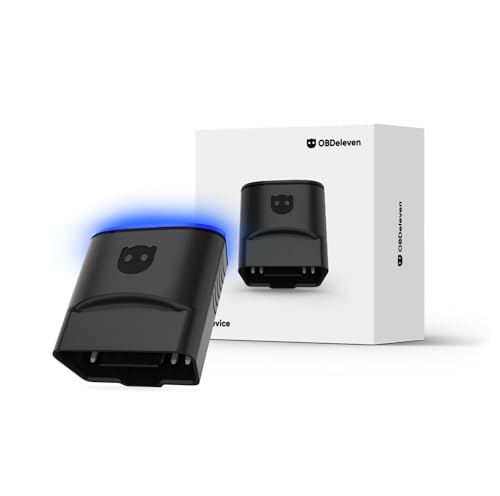
A Bluetooth OBD2 scanner is usually a small adapter that stays plugged into the diagnostic port and transmits data wirelessly to a companion app on your phone or tablet. The adapter itself has no screen and almost no intelligence; the app does the heavy lifting of translating raw codes into readable text, showing live sensor data, and offering definitions. This split design keeps the hardware cheap and compact, but it ties the whole experience to the quality and compatibility of the software you install.
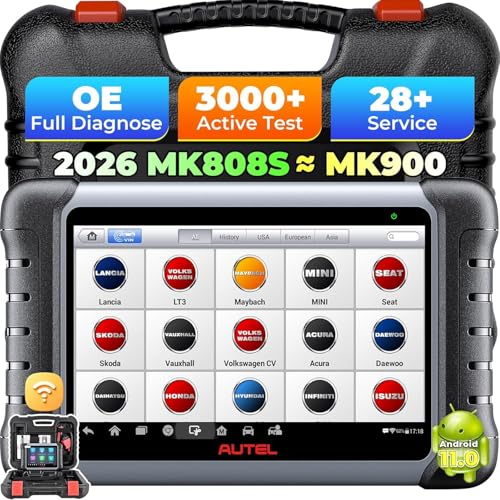
A wired handheld scanner is a complete diagnostic device on its own. It connects to the port through a cable and displays everything on a built-in screen, with physical buttons for navigation. There’s no pairing, no app to download, and no phone battery to drain. The trade-off is a bulkier tool and a fixed feature set defined by the unit’s firmware. Understanding this fundamental difference in where the processing and display live explains most of the strengths and weaknesses that follow.
Reliability and Connection Stability
Reliability is where the two approaches diverge most. A wired scanner has a direct physical connection, so it doesn’t drop out, lose signal, or struggle with interference. Once it’s plugged in and powered, the link to the vehicle is steady, which matters when you’re reading live data during a road test or running a long monitor cycle. There’s no second device that can go to sleep, run low on battery, or wander out of range.
Bluetooth adapters add a wireless hop that can introduce hiccups. Connection drops, pairing failures after a phone update, and laggy live data are common complaints, especially with budget dongles or older phones. Quality varies widely between brands, and a cheap adapter may simply refuse to talk to certain apps. When the connection holds, the experience is smooth, but the dependence on stable wireless and a healthy app is a real consideration if you need dependable results every time.
Features and Diagnostic Depth
Wired handheld scanners often carry deeper, more capable diagnostics, particularly at the mid and upper tiers. Many can access manufacturer-specific codes, perform bidirectional tests, reset service intervals, and cover systems beyond the engine such as ABS, airbag, and transmission. Because the feature set is baked into the firmware, you know exactly what the unit can do out of the box, and capable wired tools are a major reason shops still rely on dedicated hardware.
Bluetooth adapters can match or even exceed basic wired units once paired with a strong app, since software updates can add new features and the phone screen offers rich graphs and clean menus. The catch is that advanced capabilities frequently sit behind app subscriptions or premium tiers, and free apps may only read and clear generic codes. If you compare options among the best obd2 scanners, you’ll see both types span the range from simple code readers to full professional tools.
Convenience and Everyday Use
Convenience is the headline argument for Bluetooth. The adapter is tiny, easy to stow, and turns a phone you already carry into a diagnostic display with a familiar touchscreen, large readable text, and the ability to look up codes online instantly. For someone who scans occasionally, sharing a screenshot of a fault with a mechanic or forum is easy, and the same dongle can serve multiple drivers in a household who each install the app.
Wired scanners win on simplicity of operation. There’s nothing to pair, no app to keep updated, and no risk that a phone change breaks your setup. You grab the tool, plug it in, and it works the same way every time, which is ideal for users who don’t want to fiddle with software. The downside is carrying a separate device and living with a smaller fixed screen, but for plug-and-go reliability the wired path is hard to beat.
Security of Leaving an Adapter Plugged In
A practical concern unique to Bluetooth dongles is that many people leave them permanently plugged into the port. A constantly connected adapter can draw a small amount of power even when the car is off, which over weeks of inactivity may contribute to a drained battery, so it’s wise to unplug it if the vehicle will sit for a long time. Some adapters include a sleep mode to reduce this risk, but behavior varies by model.
There’s also a data and access angle. A wireless adapter that stays in the port and broadcasts can, in theory, be an entry point if it has weak pairing security, and it remains visible to anyone with physical access to the cabin. A wired scanner sidesteps these issues entirely because you only connect it when you’re actively diagnosing and remove it afterward. For most owners the practical move is to unplug a Bluetooth dongle when it isn’t needed and choose adapters with sensible security defaults.
Frequently Asked Questions
Can a Bluetooth OBD2 scanner do everything a wired one can?
It depends on the adapter and the app paired with it. A good adapter with a capable app can match many wired units for reading and clearing codes and viewing live data, and some go further with manufacturer-specific functions. However, advanced features often require a premium app tier, and not every adapter supports every protocol, so a quality wired scanner can still offer deeper built-in capability without extra software.
Is it safe to leave a Bluetooth OBD2 adapter plugged in all the time?
It’s generally fine for short periods, but leaving one connected for weeks while a car sits unused can slowly draw down the battery. Many adapters have a sleep mode, yet behavior differs by brand. The safest habit is to unplug the adapter when you won’t drive for a while and to choose a model with good pairing security so it can’t be accessed easily by others.
Which type is better for someone who rarely scans their car?
For occasional use, a Bluetooth adapter is often the most convenient and budget-friendly choice because it’s compact and turns your existing phone into the display. If you prefer a tool that simply works every time with no app to manage, a basic wired scanner is the more foolproof option. Both can read and clear common engine codes, so the decision comes down to whether you value convenience or plug-and-go simplicity.
The Bottom Line
Choosing between a Bluetooth and a wired OBD2 scanner comes down to matching the tool to your habits. Bluetooth adapters are compact, affordable, and convenient, leaning on your phone for a rich display and easy code lookups, but they depend on stable wireless and a healthy app, and they raise small concerns about battery draw and security if left plugged in. Wired handheld scanners are self-contained and dependable, with no pairing to manage and often deeper built-in diagnostics, at the cost of a bulkier device and a fixed feature set. Casual users who scan now and then tend to favor the wireless route for its ease, while those who want rock-solid reliability or professional-grade depth gravitate toward wired tools. Decide which trade-offs you can live with, and either path will get the job done.
Related Guides
- 7 Best OBD2 Scanners with Throttle Relearn (Researched and Compared)
- 7 Best OBD2 Scanners for Ram 1500 (Researched and Compared)
- 7 Best OBD2 Scanners for Toyota Hybrid in 2026 (Researched and Compared)
- 7 Best Car Diagnostic Scanners for All Cars (Researched and Compared)
- Where Is the OBD2 Port
- 7 Best OBD2 Scanners for Volkswagen (Researched and Compared)