J2534 ECU programming devices, also called PassThru adapters, let you reflash engine control units using OEM software from Ford, GM, Chrysler, Toyota and virtually every other manufacturer. Whether you’re a professional technician updating a module or a dedicated DIYer trying to fix a stubborn calibration issue, choosing the right PassThru tool matters far more than most buyers realize before they hit checkout.
Our goal is a comparison you can trust, not a list of sponsored winners.
| Photo | Product | Score | Buy |
|---|---|---|---|
|
🚗
|
Drew Technologies MongoosePro Ford Best Overall for Ford Full J2534-1 and J2534-2 compliance, CAN FD support, Ford IDS and FDRS certified |
9.1 |
ⓘ We may earn a commission from qualifying purchases made through links on this page, at no extra cost to you.
|
|
🚗
|
Drew Technologies MongoosePro GM Top Pick for GM Vehicles GM MDI2-compatible PassThru, certified for GDS2 and SPS programming |
8.8 | 🛒 Check Price |
|
🚗
|
Bosch OTC 3824 OBD II J2534 Best Multi-Brand Coverage Universal J2534 PassThru, broad OEM software compatibility across domestic and Asian brands |
8.5 | 🛒 Check Price |
|
🚗
|
Autel MaxiFlash Elite J2534 Best for Independent Shops J2534-1 compliant, DoIP support, compatible with Autel MaxiSys tablets and standalone OEM software |
8.2 | 🛒 Check Price |
|
🚗
|
Mongoose-Pro Chrysler MFC J2534 Best for FCA Vehicles Chrysler wiTECH 2.0 certified, CAN and ISO protocols, FCA-approved PassThru |
7.9 | 🛒 Check Price |
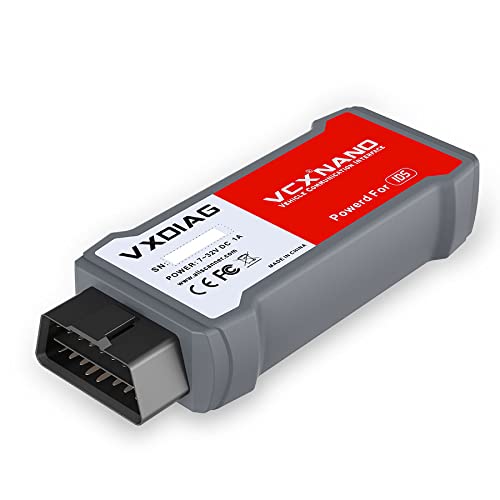 |
VXDIAG VCX NANO J2534 Best Budget Entry Point Multi-protocol J2534 PassThru, supports CAN, ISO 9141, J1850, available in brand-specific and universal configurations |
7.4 | 🛒 Check Price |
1. Drew Technologies MongoosePro Ford: Best Overall for Ford
The MongoosePro Ford is the go-to recommendation among professional Ford technicians who need a PassThru device that just works with IDS and the newer FDRS platform without hours of driver troubleshooting. Drew Technologies has maintained a close relationship with Ford’s OEM software team, and that shows in how smoothly the certification process runs compared to generic alternatives. The aluminum shell feels built to last in a real shop rather than a home garage shelf.
The obvious limitation is the brand-specific focus. If your workflow includes vehicles from multiple manufacturers, you’ll need a separate adapter for GM, Chrysler or Asian brands, which adds cost and desk clutter. This is a mid-range to premium tool, so the value proposition is strongest for dedicated Ford shops rather than general-purpose DIYers working on a single car.
- Certified for Ford IDS and the newer FDRS reflashing platform
- Supports CAN FD, ISO 15765, J1850 PWM and VPW protocols
- Durable aluminum housing built for shop environments
Pros: One of the few tools with verified Ford FDRS certification out of the box; Reliable driver stack with consistent updates from Drew Technologies
Cons: Designed specifically for Ford, so coverage of other brands requires a different adapter
2. Drew Technologies MongoosePro GM: Top Pick for GM Vehicles
GM’s single-wire CAN network (GMLAN) is a notorious stumbling block for generic J2534 adapters, and the MongoosePro GM handles it cleanly. Technicians using GDS2 for diagnostics and SPS for module programming report far fewer dropped sessions compared to white-label alternatives. The GM subscription service for SPS is already a recurring cost, so pairing it with a certified tool rather than rolling the dice on a budget adapter is a sensible investment.
Like its Ford sibling, this tool earns its premium positioning through certified compatibility rather than broad coverage. If you’re a GM specialist this is a strong buy, but general shops will find the single-brand limitation a real constraint. It sits in the mid-range to premium tier and delivers good value for shops that eat and breathe GM diagnostics every day.
- Certified for GM GDS2 diagnostics and SPS module programming
- Supports high-speed CAN, single-wire CAN (GMLAN) and legacy protocols
- Compact form factor with a sturdy USB connection
Pros: Smooth compatibility with GM's SPS subscription service for ECU reflashing; Reliable GMLAN single-wire CAN support that cheaper tools often mishandle
Cons: Limited to GM vehicles, so multi-brand shops need an additional device
3. Bosch OTC 3824 OBD II J2534: Best Multi-Brand Coverage
The Bosch OTC 3824 occupies a practical middle ground for shops that service a mix of domestic and import vehicles but don’t want to buy a separate PassThru device for every manufacturer. Compatibility reports from users running Toyota TIS Techstream, Chrysler wiTECH and Subaru Select Monitor are generally positive, though occasional driver conflicts on Windows 11 machines are a recurring complaint in forum discussions. Having Bosch’s support line available is a genuine plus when things go sideways.
The device sits at a mid-range price point that makes it attractive for independent shops and serious DIYers alike. It isn’t the absolute best at any single brand, but it’s a credible choice when you need one adapter to cover several nameplates. Expect to spend some time confirming driver compatibility with your specific operating system before committing to a critical programming session.
- Works with plenty of OEM subscription software including Toyota TIS and Chrysler wiTECH
- Supports CAN, ISO 9141, J1850 PWM and VPW communication protocols
- Backed by Bosch OTC brand reputation with available technical support
Pros: Broader multi-brand compatibility than most dedicated single-marque tools; Bosch name carries weight for warranty and replacement support
Cons: Driver installation can be fiddly on newer Windows 11 systems without manual tweaks
4. Autel MaxiFlash Elite J2534: Best for Independent Shops
The MaxiFlash Elite stands out because it adds DoIP support, which handles the Ethernet-based gateway architecture found in many post-2018 vehicles from Volkswagen, BMW and others. Shops that are starting to see more of these platforms will appreciate the forward compatibility. Pairing it with a MaxiSys tablet also unlocks a guided programming workflow that reduces the chance of a botched session, which is a real comfort when you’re rewriting engine calibrations.
The catch is that Autel’s tool integrates most cleanly within its own ecosystem. If you rely exclusively on OEM subscription software and want a transparent J2534 adapter with no brand overlay, the MaxiFlash Elite can feel like it has opinions about how you work. It’s a mid-range to premium device that earns its keep in busy shops but may feel over-engineered for a single-vehicle DIY project.
- DoIP (Ethernet-over-IP) protocol support for newer vehicle architectures
- Works standalone with OEM software or paired with Autel MaxiSys scan tools
- Firmware updates delivered via Autel's cloud update platform
Pros: DoIP support future-proofs the tool for vehicles with Ethernet-based diagnostics; Dual-mode use as standalone PassThru or MaxiSys companion adds flexibility
Cons: Full feature set is tied to Autel's ecosystem, which can frustrate purely OEM-software workflows
5. Mongoose-Pro Chrysler MFC J2534: Best for FCA Vehicles
For technicians who live in the FCA world, the Mongoose-Pro Chrysler makes wiTECH 2.0 programming sessions noticeably more predictable. Dropped connections and protocol timeouts are common complaints with uncertified adapters running wiTECH, and having an FCA-approved device largely eliminates that frustration. The compact form factor is a genuine plus for mobile techs who are already hauling a laptop and a subscription to every job.
The value calculation here’s straightforward: if you work on Chrysler, Dodge, Jeep and Ram vehicles regularly, this tool pays for itself in avoided headaches. If your car parc includes a mix of brands, the single-marque limitation means you’re still buying a second adapter anyway. It falls in the mid-range tier and represents honest value for its target user, without a lot of extras padded in to justify the cost.
- Certified for Chrysler wiTECH 2.0 subscription programming platform
- Covers Chrysler, Dodge, Jeep and Ram module programming
- Compact design with a standard USB interface
Pros: Official FCA certification removes guesswork when running wiTECH 2.0 sessions; Compact size is convenient for mobile technicians
Cons: Single-brand focus limits usefulness for shops with diverse vehicle lineups
6. VXDIAG VCX NANO J2534: Best Budget Entry Point
The VXDIAG VCX NANO is the tool that comes up constantly in budget-focused discussions, and for good reason: the price point opens OEM ECU programming to DIYers who can’t justify a certified shop adapter for a single vehicle. Users running Toyota TIS Techstream or Ford IDS on a dedicated Windows 10 laptop often report acceptable results once drivers are properly configured. The active online community is a genuine asset when you hit an unexpected error code mid-session.
Honesty requires noting the inconsistency. Driver conflicts, occasional session drops and spotty compatibility with the latest OEM software versions are recurring themes in user reviews. This is a budget tool in behavior as much as price, and you shouldn’t use it for a high-stakes programming job without a backup plan. For a hobbyist who has time to troubleshoot and a low-stakes use case, the value is real. For a shop where downtime costs money, the certified alternatives earn their premium.
- Budget-friendly entry point into OEM-software ECU programming
- Available in Toyota, Ford, GM and multi-brand configurations
- Active community support with shared driver guides and firmware tips
Pros: Significantly lower upfront cost than certified OEM-sourced adapters; Large user community means troubleshooting resources are easy to find online
Cons: Driver stability and OEM software compatibility are inconsistent, requiring patience and forum research before critical sessions
Frequently Asked Questions
What is a J2534 ECU programming device and do I really need one?
A J2534 PassThru device is a hardware interface that connects your laptop to a vehicle’s OBD2 port and lets manufacturer OEM software read from and write to the ECU. You need one when performing official reflashes, module calibrations, or software updates that dealer-level software requires. Generic scan tools can’t replace a PassThru adapter for this task because they don’t pass raw protocol data from the OEM application to the vehicle in the way the J2534 standard specifies.
Can one J2534 device work with all car brands?
In theory yes, because the J2534 standard is designed to be manufacturer-agnostic. In practice, compatibility varies. Some adapters are certified only for specific OEM software, while others aim for broad coverage but may have gaps. Before buying, check whether the adapter is explicitly listed as compatible with the OEM subscription software you plan to use, such as Ford IDS, GM GDS2, Toyota TIS Techstream, or Chrysler wiTECH. Budget adapters often have community-evaluated workarounds but no official certification.
Do I need a subscription to use J2534 ECU programming software?
Most OEM programming platforms require a paid subscription. Ford FDRS and IDS, GM SPS, Chrysler wiTECH 2.0, and Toyota TIS Techstream all have subscription tiers ranging from daily access to annual plans. The J2534 adapter is the hardware piece that talks to the car, but the software subscription is separate and typically paid directly to the manufacturer or an authorized distributor. Factor that recurring cost into your total budget before purchasing.
Is it safe to reprogram my own ECU at home?
ECU reprogramming carries real risk if a session is interrupted mid-write, which can leave a module in an unbootable state. Using a certified adapter, a stable power supply (or battery maintainer), a reliable laptop with a wired internet connection, and genuine OEM software reduces that risk substantially. Budget adapters with driver instability increase the chance of a dropped session at the worst possible moment. For a first-time user, practicing on a lower-stakes module or having a backup plan is strongly advised.
What is the difference between J2534-1 and J2534-2 compliance?
J2534-1 covers the core protocol set including CAN, ISO 9141, J1850 PWM and J1850 VPW, which handles the vast majority of passenger car ECU programming tasks. J2534-2 adds support for manufacturer-specific extensions such as additional CAN channels, ISO 15765 extensions, and protocols like Ford’s single-wire CAN. If you’re working on newer vehicles or specific modules that require extended protocol support, confirming J2534-2 compliance on your adapter is worthwhile. Many professional tools support both; many budget adapters cover only J2534-1.
Our Verdict
For most professional technicians, the Drew Technologies MongoosePro line (Ford or GM variant depending on your primary marque) is the top pick because certified OEM compatibility removes the uncertainty that makes cheaper alternatives risky for high-stakes programming sessions. The Autel MaxiFlash Elite is a strong runner-up for independent shops that service multiple brands and want DoIP support for newer vehicle architectures. If your budget is tight and you have time to research driver configurations, the VXDIAG VCX NANO offers a genuine entry point into OEM ECU programming, with the understanding that patience and community resources are part of the package.
