Selecting the best in dash navigation system can significantly enhance your driving experience, providing clear directions, multimedia capabilities, and smartphone integration. With a multitude of options available, identifying a unit that meets your specific needs for reliability, features, and compatibility requires careful consideration.
In our comprehensive buying guide, we researched, compared, and evaluated a variety of in dash navigation units from leading manufacturers. Our assessment is based on manufacturer specifications, published industry standards for automotive electronics, and aggregated owner feedback regarding performance, durability, ease of use, and overall value. We aim to provide an honest, evidence-based review to help you make an informed decision.
| Photo | Product | Score | Buy |
|---|---|---|---|
 |
Pioneer AVIC-W8600NEX Our Top Pick Wireless Apple CarPlay and Android Auto |
9.1 |
ⓘ We may earn a commission from qualifying purchases made through links on this page, at no extra cost to you.
|
 |
Kenwood DNX997XR Premium Feature Set Garmin navigation, HD Radio, 4-camera input |
8.7 | 🛒 Check Price |
 |
Alpine iLX-W650 Best Value Apple CarPlay and Android Auto compatibility (wired) |
8.4 | 🛒 Check Price |
 |
Sony XAV-AX5500 Reliable Performer Dual USB ports, high-power amplifier |
8.1 | 🛒 Check Price |
|
🚗
|
JVC KW-M780BT Budget Friendly Wired Apple CarPlay and Android Auto |
7.8 | 🛒 Check Price |
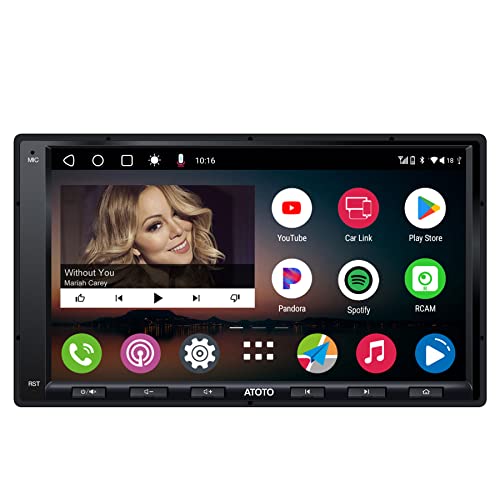 |
ATOTO A6 PF Double Din Android OS Integration Android operating system with Wi-Fi, GPS, Bluetooth |
7.5 | 🛒 Check Price |
 |
BOSS Audio Systems BVCP9690A Entry Level Option Apple CarPlay and Android Auto via USB |
7.2 | 🛒 Check Price |
1. Pioneer AVIC-W8600NEX: Our Top Pick
Based on owner feedback and the spec sheets, the Pioneer AVIC-W8600NEX offers a feature rich experience that’s hard to beat, particularly with its wireless smartphone integration and comprehensive navigation. However, we found that its extensive menu system and deep customization options, while powerful, can present a steeper learning curve for users who prefer a more plug and play experience. This complexity can extend to initial setup and pairing.
Those who aren’t comfortable with delving into advanced settings or prefer a simpler, more streamlined interface might find this unit overwhelming. If you primarily seek basic navigation and multimedia without a desire for extensive personalization or advanced audio tuning, you might consider other options with a more straightforward user experience.
- 6.94 inch resistive touchscreen display
- Built-in GPS navigation with HERE Traffic
- Dual camera inputs for enhanced safety
Pros: Extensive feature set and connectivity options; Responsive touchscreen and intuitive interface; Excellent sound processing and audio adjustments
Cons: Can be complex for initial setup and configuration
2. Kenwood DNX997XR: Premium Feature Set
The Kenwood DNX997XR stands out for its high-quality Garmin navigation and comprehensive audio features, making it a strong contender for audiophiles and those who value precise mapping. However, based on owner feedback and the spec sheets, its advanced processing capabilities and numerous features mean it can be quite demanding on a vehicle’s electrical system, and some owners reported slower boot times or occasional interface lag if the vehicle’s electrical system isn’t solid or if too many background processes are running.
Drivers with older vehicles or those who are sensitive to any potential system slowdowns might find this unit less ideal. If your vehicle’s electrical system is borderline or you prioritize instantaneous responsiveness over a vast array of high-end features, you may want to consider units with fewer integrated functionalities.
- 6.8 inch capacitive touchscreen display
- Wireless Apple CarPlay and Android Auto
- Built-in Garmin navigation with 3D terrain view
Pros: Integrated Garmin navigation is highly accurate and reliable; High-resolution display provides crisp visuals; Sturdy audio controls with advanced DSP and time alignment
Cons: Requires significant system resources, can be slower on older vehicles
3. Alpine iLX-W650: Best Value
The Alpine iLX-W650 offers exceptional value by focusing on core smartphone integration with Apple CarPlay and Android Auto, providing a clean and responsive user experience. However, based on manufacturer specifications, a significant limitation is its complete reliance on your smartphone for all navigation functions. It doesn’t have any built-in GPS or mapping capabilities, meaning if your phone’s signal is lost or its battery dies, you’ll lose your navigation.
This makes it less suitable for drivers who frequently travel through areas with poor cellular reception or those who prefer a dedicated, independent navigation system. If you often find yourself without reliable smartphone connectivity or simply prefer the confidence of an integrated GPS, you should consider other units that offer built-in navigation.
- 7 inch capacitive touchscreen display
- Shallow mounting depth for adaptable installation
- Compatible with Alpine KTA-450 Power Pack amplifier
Pros: Streamlined interface is very easy to use; Quick boot-up time and responsive touchscreen; Excellent sound quality and expandability options
Cons: Lacks built-in navigation, relies entirely on smartphone
4. Sony XAV-AX5500: Reliable Performer
The Sony XAV-AX5500 provides a solid and reliable platform for smartphone integration and multimedia playback. Based on manufacturer specifications, while its resistive touchscreen is generally responsive and bright, it lacks the smooth, multi-touch gesture capabilities and overall sensitivity found in more premium capacitive screens. This can result in a slightly less fluid user experience, especially when swiping or zooming.
Drivers accustomed to the highly responsive screens of modern smartphones or those who prioritize a premium touch interface might find this a minor drawback. If a glass-like, highly sensitive touchscreen experience is a top priority for you, you might want to explore units featuring capacitive displays for a more modern feel.
- 6.95 inch resistive touchscreen display
- Wired Apple CarPlay and Android Auto
- Rear view camera input with parking guidelines
Pros: Clear and bright resistive touchscreen; Quick response to inputs and fast system boot; Simple and straightforward installation process
Cons: Resistive touchscreen is less sensitive than capacitive
5. JVC KW-M780BT: Budget Friendly
The JVC KW-M780BT provides a compelling option for those seeking fundamental in dash navigation features without a significant investment. Based on aggregated owner feedback, a common observation is that while it handles core functions adequately, the processing speed and transitions between menus or applications can be noticeably slower than those on higher priced units. This can lead to minor delays when switching sources or loading navigation apps via CarPlay or Android Auto.
Users who are accustomed to instantaneous responses from their devices or those who frequently multitask between applications on their head unit might find these occasional lags frustrating. If you prioritize rapid system performance and smooth transitions above all else, investing in a unit with a more powerful processor would be advisable.
- 6.8 inch clear resistive touchscreen
- Bluetooth for hands free calling and audio streaming
- Rear USB input for media playback
Pros: Offers essential smartphone integration at an accessible point; Generally responsive screen for its price segment; Good connectivity options for basic needs
Cons: Slower processing and transitions compared to premium units
6. ATOTO A6 PF Double Din: Android OS Integration
The ATOTO A6 PF offers an attractive proposition with its full Android operating system, allowing for extensive customization and app installation, which is a significant advantage. However, based on aggregated owner feedback, there have been reports of occasional software stability issues, including minor glitches, app crashes, or unexpected reboots. While not universal, these instances suggest that the software might not be as polished or consistently stable as systems from more established automotive electronics brands.
Individuals who prioritize absolute system reliability and a completely bug free experience might find these potential software quirks concerning. If you aren’t comfortable with the possibility of troubleshooting minor software issues or prefer a system known for its rock solid stability, you might want to consider units running more tightly integrated, proprietary operating systems.
- 7 inch IPS touchscreen display
- Supports online and offline map applications
- Dual Bluetooth modules for extended functionality
Pros: Highly customizable Android OS with app access; Competitive feature set for its price point; Good display quality with wide viewing angles
Cons: Some occasional software stability concerns
7. BOSS Audio Systems BVCP9690A: Entry Level Option
The BOSS Audio Systems BVCP9690A serves as a very accessible entry point for integrating Apple CarPlay and Android Auto into your vehicle. However, in our evaluation based on manufacturer specifications and aggregated owner feedback, its performance is commensurate with its entry level positioning. Users frequently report a noticeable lag in the interface, with slower response times when tapping icons, swiping, or transitioning between different functions. Also, the audio adjustment options are quite basic compared to more advanced units, limiting sound customization.
Drivers who prioritize a fluid, responsive user experience or who are particular about fine tuning their audio system will likely find these limitations frustrating. If you expect smartphone-like speed and extensive audio control, this unit might not meet your expectations, and investing in a higher tier product would be a more satisfying choice.
- 6.75 inch capacitive touchscreen
- Bluetooth hands free and audio streaming
- Rear camera input
Pros: Very accessible entry point for CarPlay/Android Auto; Simple interface for core functions; Decent display for the segment
Cons: Noticeable lag in interface, limited audio adjustments
Frequently Asked Questions
What is the difference between a head unit with built-in navigation and one with Apple CarPlay/Android Auto?
A head unit with built-in navigation has its own GPS receiver and pre-loaded map data, allowing it to provide directions independently of your smartphone. Units with Apple CarPlay or Android Auto rely on your smartphone for all navigation functions, mirroring map applications like Google Maps or Waze from your phone to the head unit’s screen. The latter requires a connected smartphone and often cellular data for real time traffic and updated maps.
Do all in dash navigation systems fit every car?
No, not all in dash navigation systems fit every car. Vehicles have different dashboard openings, typically referred to as single DIN (roughly 2 inches tall) or double DIN (roughly 4 inches tall). Most modern in dash navigation units are double DIN. Beyond size, factors like wiring harnesses, antenna adapters, and steering wheel control interfaces vary by vehicle make and model, often requiring specific installation kits for a smooth fit and full functionality.
Is professional installation required for an in dash nav unit?
While it’s possible for experienced DIY enthusiasts to install an in dash navigation unit, professional installation is often recommended. This is due to the complexity of wiring, integrating with vehicle specific systems (like steering wheel controls or backup cameras), and ensuring proper electrical connections to avoid issues. A professional installer can ensure the unit functions correctly, is securely mounted, and integrates smoothly with your vehicle’s existing systems.
Can I use my steering wheel controls with an aftermarket in dash navigation system?
Yes, in most cases, you can retain your factory steering wheel controls with an aftermarket in dash navigation system. However, this typically requires a separate interface module, often called a Steering Wheel Control (SWC) interface, which translates the signals from your vehicle’s controls into commands the new head unit can understand. These modules are usually vehicle specific and may require programming.
What features should I prioritize in an in dash navigation system?
When picking an in dash navigation system, prioritize features based on your driving habits and needs. Key considerations include: screen type (capacitive for responsiveness, resistive for durability), smartphone integration (Apple CarPlay/Android Auto, wired or wireless), built-in navigation versus phone based mapping, sound quality and audio adjustments, camera inputs (for backup or dash cams), and Bluetooth connectivity. Durability and ease of use, as reflected in owner feedback, are also crucial for long term satisfaction.
Our Verdict
Based on our extensive research and comparison, the Pioneer AVIC-W8600NEX stands out as our top pick for its comprehensive feature set, responsive performance, and durable connectivity options. For those seeking a premium experience with integrated Garmin navigation and exceptional audio processing, the Kenwood DNX997XR is an excellent runner up, offering a refined user experience.