Driving a bus is nothing like driving a car. A standard consumer GPS will happily send you under a 12 foot railway bridge, down a residential street with a weight limit, or into a turn no transit or coach can physically make. What bus drivers actually need is a navigator that knows the height, weight, and length of the vehicle and routes around the hazards that matter, while staying readable from a high seat in bright sun.
We focused on the GPS class that commercial truck and RV drivers rely on, because that’s exactly the routing logic a coach, shuttle, or school bus driver needs. We weighed screen size and glare, the quality of low-bridge and weight-limit warnings, lane guidance through complex junctions, mount stability over rough roads, and how easy it’s to enter your vehicle profile. Here are the seven units worth your attention.
| Photo | Product | Score | Buy |
|---|---|---|---|
 |
Garmin dezl OTR710 Best Overall 7-inch HD touchscreen, custom truck/large-vehicle routing, magnetic mount |
9.5 |
ⓘ We may earn a commission from qualifying purchases made through links on this page, at no extra cost to you.
|
 |
Garmin dezl OTR810 Best Big Screen 8-inch HD edge-to-edge display, large-vehicle routing, voice assist |
9.3 | 🛒 Check Price |
 |
Garmin RV 1090 Best Large Display 10-inch HD display, custom RV/large-vehicle routing, towing-aware |
9.1 | 🛒 Check Price |
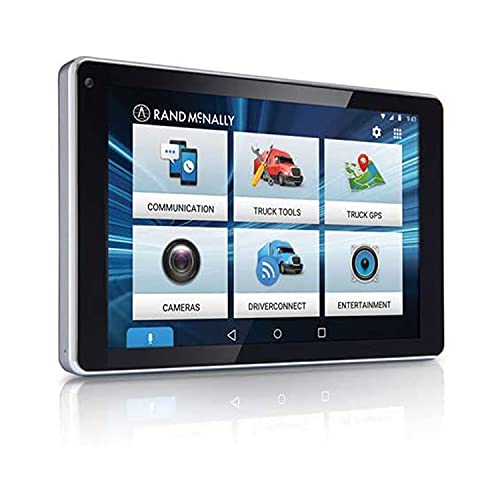 |
Rand McNally OverDryve 7 Pro Best Commercial Features 7-inch tablet-style unit, commercial routing, built-in dash cam |
8.9 | 🛒 Check Price |
 |
Garmin dezl OTR500 Best Compact 5.5-inch display, custom truck routing, compact footprint |
8.7 | 🛒 Check Price |
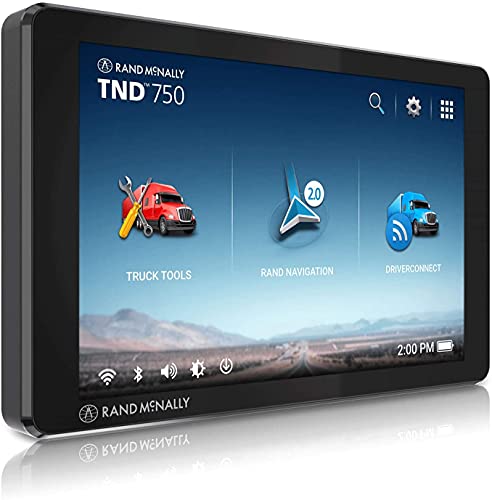 |
Rand McNally TND 750 Best for Restricted Roads 7-inch display, truck-specific routing, electronic logging compatible |
8.5 | 🛒 Check Price |
 |
Garmin Drive 53 Best Simple Backup 5-inch display, driver alerts, simple reliable navigation |
8.2 | 🛒 Check Price |
1. Garmin dezl OTR710: Best Overall
The Garmin dezl OTR710 is built from the ground up for large vehicles, and that’s exactly why it sits at the top of this list for bus drivers. You enter your vehicle profile once, including height, weight, length and width, and the routing engine actively steers you away from low clearances, weight-restricted roads, and turns a long vehicle can’t make. The 7-inch HD screen is bright and sharp enough to read from a raised coach or transit seat without squinting, and the lane guidance with detailed junction view takes the guesswork out of multi-lane interchanges where a missed exit means a painful detour in a 40-foot vehicle.
It isn’t flawless. The trucking-oriented setup has a learning curve, and a driver coming from a phone app will need a little patience to configure the profile correctly and trust the warnings. The points-of-interest data also leans toward truck stops rather than depots, schools, or transit hubs, so you may still keep your own list of stops. Even so, the combination of dependable large-vehicle routing, a class-leading display, and a rock-solid magnetic mount makes this the unit we would put in a bus first.
- Routes by vehicle height, weight, length and width to avoid low bridges and restricted roads
- Bright 7-inch HD display readable from a high driving position
- High-resolution junction view with clear lane assist for complex interchanges
Pros: Excellent, well-maintained large-vehicle road data and bridge alerts; Big, glare-resistant screen that’s easy to read at a glance; Powered magnetic mount holds firm over bumps and potholes
Cons: The custom profile and trucking features can feel like a lot to set up at first; Some bus-specific stops aren’t in the truck points-of-interest database
2. Garmin dezl OTR810: Best Big Screen
If your main complaint about a GPS is that you can’t read it quickly enough, the Garmin dezl OTR810 answers with a generous 8-inch edge-to-edge display. For bus drivers who sit high and need to glance and return their eyes to the road instantly, the larger map and oversized turn prompts genuinely reduce the time your attention leaves traffic. Under the hood it carries the same large-vehicle routing as its 7-inch sibling, so you still get height, weight and length aware directions, low-bridge alerts, and warnings for roads your vehicle shouldn’t be on.
The trade-off is physical size. On a smaller shuttle windshield the 810 can intrude more than you want, and you should plan your mounting position carefully so it doesn’t block sightlines. The built-in voice assistant is a nice touch for changing a destination without reaching for the screen, though in a noisy cab with the engine working and passengers aboard it sometimes mishears commands. For drivers who prioritize a big, clear screen above all else, this is the one to get.
- Spacious 8-inch screen makes maps and turn instructions easy to read
- Customizable large-vehicle routing with low-bridge and road-restriction warnings
- Built-in voice assist lets you change destinations without taking hands off the wheel
Pros: Larger display than most units, ideal for a high bus seating position; Same trusted Garmin large-vehicle routing and hazard alerts; Hands-free voice control supports safer operation on the road
Cons: The bigger unit takes up more windshield or dash real estate; Voice recognition can struggle with road and engine noise in a busy cab
3. Garmin RV 1090: Best Large Display
The Garmin RV 1090 brings a massive 10-inch display to the cab, and for long-distance coach drivers that real estate is a real comfort. Maps are easy to read at speed, the buttons are large enough to tap accurately on a bouncing road, and the routing accounts for vehicle height, weight and length to keep you clear of low bridges and unsuitable roads. It also flags sharp curves, steep grades, and warns of upcoming services, which is exactly the kind of forward planning a driver of a long, heavy vehicle wants.
Because this unit is aimed at the RV market, a few of its conveniences revolve around campgrounds and leisure travel rather than commercial bus operations, so you’ll ignore some of its directory entries. The sheer size is also a placement challenge in a smaller shuttle or minibus where windshield space is limited. But if you run a full-size coach on highways and value a screen you can read without effort, the RV 1090 is a strong and capable choice.
- Huge 10-inch screen with crisp maps and easy-to-tap controls
- Custom routing for tall, heavy, long vehicles including bridge clearance
- Directory of large-vehicle friendly stops and services along the route
Pros: Among the largest, clearest displays you can fit in a cab; Routing logic suits big coaches and motorhome-class vehicles equally well; Helpful warnings for sharp curves and steep grades ahead
Cons: The 10-inch size is hard to place on tight windshields; Geared toward RV travel, so some commercial bus features are absent
4. Rand McNally OverDryve 7 Pro: Best Commercial Features
Rand McNally has a long history in commercial navigation, and the OverDryve 7 Pro packages that experience into a tablet-style device that does more than route. You set your vehicle dimensions and it plans around low bridges, weight limits, and restricted roads in a way a consumer GPS simply can’t. The standout extra is the built-in dash cam, which records the road ahead and gives a bus driver useful protection in the event of a dispute or incident, all without bolting a second gadget to the glass. Weather, live traffic, and hands-free calling round out a genuinely commercial feature set.
The honest weakness is the software. Running on an Android base, the interface is flexible but can feel slower and a touch less refined than Garmin’s dedicated navigation experience, and you’ll want to keep the maps and restriction database current to trust the routing fully. If you value commercial routing plus an integrated camera in one unit and can live with a less snappy interface, the OverDryve 7 Pro earns its place.
- Commercial-grade routing built around vehicle dimensions and road restrictions
- Integrated dash cam records the road for incident protection
- Android-based interface with weather, traffic, and hands-free calling
Pros: Routing designed specifically for large commercial vehicles; Built-in dash cam adds protection without a second device; Familiar tablet-style interface is easy to learn
Cons: Software can feel slower and less polished than Garmin units; Occasional map and database updates are needed to stay accurate
5. Garmin dezl OTR500: Best Compact
Not every bus has a wide windshield, and minibus and shuttle drivers often need a navigator that doesn’t eat their forward view. The Garmin dezl OTR500 keeps the same large-vehicle routing brain as Garmin’s bigger units but shrinks it into a tidy 5.5-inch package. You still get height, weight and length aware directions, low-bridge alerts, and warnings for roads your vehicle should avoid, plus the same reliable powered magnetic mount that snaps in and out when you switch vehicles.
The compromise is obvious: the smaller screen is harder to read at a glance from a raised seat, and complex junction views are more cramped than they’re on a 7 or 8-inch display. For a driver who spends most of the day on well-known urban routes and values a clean, unobtrusive setup, that trade is worth it. For long highway runs where you live on the map, you may prefer to size up. As a compact commercial navigator, the OTR500 punches well above its size.
- Compact 5.5-inch unit fits tight shuttle and minibus windshields
- Full large-vehicle routing with low-bridge and weight warnings
- Powered magnetic mount for quick removal and secure hold
Pros: Small enough for cramped cabs without blocking the view; Carries the same Garmin large-vehicle routing as bigger models; Easy to move between vehicles thanks to the magnetic mount
Cons: Smaller screen is harder to read from a high seat; Less room on screen for detailed junction views
6. Rand McNally TND 750: Best for Restricted Roads
The Rand McNally TND 750 is unapologetically a commercial driver’s tool. Its truck and large-vehicle road database is one of its strongest assets, flagging low clearances, weight limits, and sharp turns with the kind of detail that keeps a tall, heavy bus out of trouble. You enter your vehicle profile and the unit routes around the roads that would otherwise become an expensive mistake, and for fleet operators it plays nicely with electronic logging accessories, which is a meaningful bonus for organized bus operations.
Where it shows its age is the experience. The interface looks dated compared with Garmin’s slicker presentation, and the touchscreen doesn’t respond with the same crispness, so menu navigation can feel a step behind. None of that undermines the routing, which is the part that actually keeps you safe. If restricted-road accuracy and fleet compatibility matter more to you than a modern interface, the TND 750 delivers where it counts.
- Detailed truck and large-vehicle road database with restriction alerts
- Clear warnings for low clearances, sharp turns, and weight limits
- Compatible with electronic logging accessories for commercial fleets
Pros: Strong large-vehicle restriction data for avoiding hazards; Purpose-built for commercial drivers, not adapted from a car unit; Fleet-friendly with logging compatibility
Cons: Interface design feels dated next to newer rivals; Touchscreen response is less crisp than premium units
7. Garmin Drive 53: Best Simple Backup
The Garmin Drive 53 is the honest budget-minded entry here, and it earns a spot as a dependable backup or a fit for drivers on simple, well-known urban routes. It’s a clean, fast, no-fuss navigator with a bright 5-inch screen, reliable Garmin maps, and a useful set of driver alerts for sharp curves, school zones, and speed changes, all of which are genuinely handy in stop-and-go bus work. For a driver who already knows the route and just wants a clear second opinion and accurate arrival times, it does the job well.
The critical caveat is that this is a consumer car GPS, not a large-vehicle unit. It doesn’t route by height, weight, or length, and it won’t warn you about a low bridge or a weight-restricted road. That makes it a poor sole navigator for an unfamiliar route in a tall bus, and you should treat it strictly as a simple, supplementary tool. Within those limits it’s reliable and pleasant to use, which is why it makes the list as a value-focused backup.
- Bright 5-inch display with clear, straightforward turn-by-turn guidance
- Driver alerts for sharp curves, school zones, and speed changes
- Simple, fast interface that’s easy for any driver to pick up
Pros: Very easy to use with a clean, responsive interface; Useful driver awareness alerts for safer routes; Reliable Garmin maps and dependable everyday navigation
Cons: No dedicated large-vehicle or low-bridge routing; Small screen and not built for commercial dimensions
Frequently Asked Questions
Can a regular car GPS work for driving a bus?
A regular car GPS can give you directions, but it doesn’t know your vehicle is tall, heavy, and long, so it’ll route you under low bridges, down weight-restricted roads, and into turns a bus can’t make. For safe bus driving you want a unit built for large or commercial vehicles that lets you enter your height, weight, length and width, then actively routes around hazards. A car GPS is fine only as a backup on routes you already know well.
How does a bus GPS know to avoid low bridges?
Large-vehicle units like the Garmin dezl and Rand McNally truck models carry a road database that includes clearance heights, weight limits, and other restrictions. When you enter your vehicle profile, the navigator compares your height and weight against that data and plans a route that keeps you clear of anything you can’t safely pass. It also gives audible and on-screen warnings as you approach a restriction, so you can react even if the map data isn’t perfect. Keeping the database updated is important for this to stay reliable.
What screen size is best for a bus driver?
Bus drivers usually sit high, so a larger screen of 7 inches or more is easier to read at a glance, which keeps your eyes on the road longer. A 7-inch unit is a great all-round balance, while 8 and 10-inch models suit long-haul coaches where you want maximum readability. Smaller 5 to 5.5-inch units make sense for minibuses and shuttles with tight windshields, but you trade away some readability and detail in complex junction views.
Do I need a truck GPS or an RV GPS for a bus?
Either can work, because both route by vehicle dimensions and avoid low bridges and restricted roads, which is the core need for a bus. Truck-oriented units like the Garmin dezl series tend to focus on commercial stops and fleet features, while RV units like the Garmin RV 1090 add leisure-travel conveniences you may not use. For most bus drivers a truck or commercial unit is the most natural fit, but a large RV navigator is a fine alternative if you want a bigger screen.
Should I just use my phone instead of a dedicated bus GPS?
Phone apps are convenient and great for cars, but mainstream ones don’t route by vehicle height, weight, or length, so they won’t protect you from low bridges or weight-restricted roads in a bus. They also depend on a cellular signal that can drop in tunnels or rural areas, while a dedicated unit stores maps onboard. A dedicated large-vehicle GPS gives you the right routing, a bigger glare-resistant screen, and a stable mount built for the cab, which is why it remains the safer choice for professional bus driving.
Our Verdict
For most bus drivers the Garmin dezl OTR710 is the unit to buy first. It pairs dependable large-vehicle routing and low-bridge warnings with a bright, readable 7-inch screen and a mount that survives rough roads, which is exactly the combination a coach, shuttle, or school bus driver needs. If you want an even larger display for long highway runs, the Garmin dezl OTR810 is our runner up, offering the same trusted routing on a spacious 8-inch screen with hands-free voice control. Whichever you choose, make sure you enter your vehicle profile accurately and keep the maps updated so the hazard warnings stay reliable.


