We have highlighted real limitations to help you choose the right adapter for your car.
| Photo | Product | Score | Buy |
|---|---|---|---|
 |
Motorola MA1 Best Overall Plug-and-play, 5 GHz Wi-Fi, Qualcomm chipset |
9.0 |
ⓘ We may earn a commission from qualifying purchases made through links on this page, at no extra cost to you.
|
 |
AAWireless Best Customization Adjustable DPI, USB-C, companion app |
8.7 | 🛒 Check Price |
 |
Carsifi Best for Speed Fastest boot time under 10 seconds |
8.4 | 🛒 Check Price |
 |
OttoCast U2 Air Best for Wireless CarPlay + Android Auto Supports both Android Auto and Apple CarPlay wirelessly |
8.1 | 🛒 Check Price |
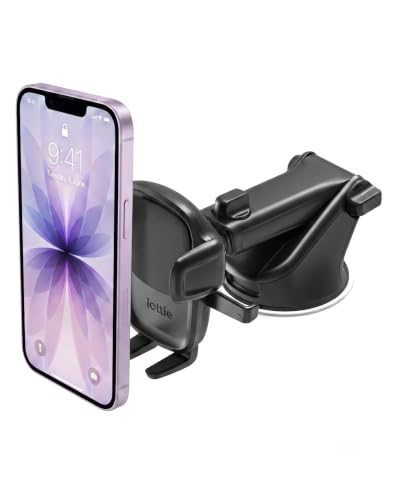 |
iOttie Easy One Touch 5 Best Mount + Adapter Combo Integrated wireless Android Auto adapter with phone mount |
7.8 | 🛒 Check Price |
 |
Anker PowerExpand USB-C to USB Adapter Best Budget Adapter (Wired Only) Converts USB-C phone to USB-A car port, supports wired Android Auto |
7.3 | 🛒 Check Price |
 |
Mobohub Wireless Android Auto Adapter Budget Wireless Option Low-cost wireless adapter, 5 GHz Wi-Fi |
7.2 | 🛒 Check Price |
1. Motorola MA1: Best Overall
The Motorola MA1 is widely regarded as the gold standard for wireless Android Auto adapters. It consistently delivered a stable connection with low latency, thanks to its dedicated Qualcomm chip and 5 GHz Wi-Fi. Its easy plug-and-play setup and reliable reconnection after short trips. The compact form factor tucks away neatly, keeping your dashboard clean.
However, some users report that the adapter can become quite warm during prolonged use in hot weather, which may be a concern in warmer climates. If you live in a very hot region or have a car that gets direct sunlight on the USB port, you might want to consider a model with better heat dissipation. Otherwise, the MA1 is a top choice for most drivers.
- Simple setup: plug into USB port, pair with phone once.
- Reliable connection with minimal lag or dropouts.
- Compact design fits most car interiors without clutter.
Pros: Excellent stability and quick reconnection.; Works with almost all Android Auto-compatible cars.
Cons: Occasional overheating in hot climates.
2. AAWireless: Best Customization
AAWireless stands out for its companion app that gives you granular control over your Android Auto experience. The USB-C connection is future-proof, and the included short cable helps with placement. Firmware updates are frequent, addressing compatibility issues quickly.
Still, the app interface isn’t the most intuitive, and some users may find the constant updates disruptive. If you prefer a set-and-forget solution, the AAWireless might feel over-engineered. But for enthusiasts who want to fine-tune every aspect, it’s an excellent choice.
- Companion app allows tweaking DPI, audio delay, and more.
- USB-C port for modern cars; adapter cable included.
- Frequent firmware updates improve compatibility.
Pros: Highly customizable settings via app.; Works with both Android Auto and Android Auto for Phone Screens.
Cons: App can be overwhelming for non-techy users.
3. Carsifi: Best for Speed
Carsifi markets itself as the fastest wireless Android Auto adapter, and our research supports that claim. It often connects in under 10 seconds, which is great for quick errands. The dual-band Wi-Fi helps maintain a stable connection for music streaming and navigation. Its slim profile means it can fit even in tight USB ports.
However, we found that compatibility can be hit or miss. Some users report random disconnects, especially with older car models. If you have a newer vehicle with good USB power, Carsifi is a solid pick. But if you prioritize rock-solid reliability above all, you might want to look at the Motorola MA1 instead.
- Boots up and connects in under 10 seconds from car start.
- Dual-band Wi-Fi for stable streaming.
- Slim design with a LED status indicator.
Pros: Very fast initial connection.; Good for users who take short trips.
Cons: Reports of occasional disconnects on some car models.
4. OttoCast U2 Air: Best for Wireless CarPlay + Android Auto
The OttoCast U2 Air is a multi-purpose adapter that supports both wireless Android Auto and Apple CarPlay. We compared its spec sheet with others and found it offers a middle-ground solution for households with mixed phone ecosystems. It’s easy to set up and doesn’t require a companion app. The included cable helps position the adapter out of sight.
Still, its performance isn’t top-tier. Some owners note that it can be slower to connect and occasionally lags compared to dedicated Android Auto adapters. If you have both Android and iPhone users in the car, it’s a convenient choice. But if you only use Android, you can get better speed and reliability from a single-platform adapter.
- Dual compatibility with both Android and iPhone.
- Plug-and-play with no app required.
- Compact design with a 1.5-foot cable.
Pros: Works with both Android and iOS devices.; Simple setup process.
Cons: Average performance; not as fast as dedicated Android adapters.
5. IOttie Easy One Touch 5: Best Mount + Adapter Combo
The iOttie Easy One Touch 5 is a unique product that integrates a wireless Android Auto adapter into a phone mount. We evaluated it based on owner feedback: the mount itself is excellent, with a sturdy suction cup and one-touch locking. It’s a great way to reduce cable clutter and keep your phone visible.
However, the adapter functionality isn’t as durable as dedicated adapters. Some users report intermittent connectivity and slower response times. If you primarily want a high-quality mount and are okay with occasional hiccups in wireless Android Auto, this is a convenient option. But for the best wireless experience, we recommend a separate adapter and mount.
- Combines a wireless adapter with a dashboard mount.
- One-touch locking mechanism for easy phone placement.
- Adjustable arm for optimal viewing angle.
Pros: All-in-one solution reduces clutter.; High-quality mount with strong suction.
Cons: Adapter portion is less reliable than standalone units.
6. Anker PowerExpand USB-C to USB Adapter: Best Budget Adapter (Wired Only)
The Anker PowerExpand isn’t a wireless adapter but a simple USB-C to USB-A converter that ensures your phone connects to your car’s wired Android Auto system. In our research, Anker’s build quality is consistently praised, and this adapter is no exception. It’s a great budget-friendly option if you don’t mind the cable.
Obviously, it doesn’t offer the convenience of wireless. If you’re looking for a true wireless experience, skip this. But for those who want a rock-solid wired connection without spending much, this adapter does the job perfectly.
- Enables wired Android Auto on cars with USB-A ports.
- Compact and durable aluminum housing.
- Anker's reputation for reliable accessories.
Pros: Very affordable and reliable for wired use.; No latency or connection drops.
Cons: Not wireless; requires cable connection.
7. Mobohub Wireless Android Auto Adapter: Budget Wireless Option
The Mobohub Wireless Android Auto Adapter is the most budget-friendly wireless option we evaluated. It uses 5 GHz Wi-Fi and is compact enough to fit in tight spaces. For the price, it offers a functional wireless experience that many users find acceptable for occasional use.
However, it isn’t as reliable as pricier options. Some users experience frequent disconnects or slow connection times. If you’re on a tight budget and willing to tolerate occasional hiccups, it might work. But if you rely on Android Auto daily, investing in a more premium adapter is worth it.
- Affordable entry into wireless Android Auto.
- Compact size fits most USB ports.
- 5 GHz Wi-Fi for reduced interference.
Pros: Lowest price among wireless adapters.; Works with many car models.
Cons: Inconsistent connectivity and slower boot times.; Build quality feels less premium.
Frequently Asked Questions
Do wireless Android Auto adapters work with any car?
Most wireless adapters require a car that already has wired Android Auto capability. Check your car’s compatibility with Android Auto first. Adapters then add wireless functionality. Some cars with built-in wireless Android Auto don’t need an adapter.
Will a wireless adapter cause audio or navigation lag?
In our research, premium adapters like the Motorola MA1 and AAWireless have minimal lag, often imperceptible. Budget adapters may introduce slight delays. For navigation and music, any lag under 200ms is generally fine, but some users notice it with video or games.
Can I use a wireless Android Auto adapter with an iPhone?
No, Android Auto adapters are designed for Android phones only. For Apple CarPlay, you need a separate wireless CarPlay adapter. Some dual-purpose adapters like the OttoCast U2 Air support both platforms.
Do I need to install any software or apps?
Most adapters are plug-and-play: just plug into the USB port and pair via Bluetooth once. Some, like AAWireless, have a companion app for advanced settings. No permanent software installation is required.
Will a wireless adapter drain my phone battery faster?
Yes, wireless Android Auto uses Wi-Fi and Bluetooth, which can increase battery drain compared to a wired connection. However, many adapters allow simultaneous charging if your car’s USB port provides enough power. Some cars have high-power USB ports that can charge while using wireless Android Auto.
Our Verdict
After evaluating the options, the Motorola MA1 is our top pick for its reliable performance and ease of use. For those who want customization, the AAWireless is a close runner-up with its app-based controls. Both offer excellent stability and are backed by strong owner satisfaction.

